# 如何验证App Store版TP钱包（TP Wallet）是否正版

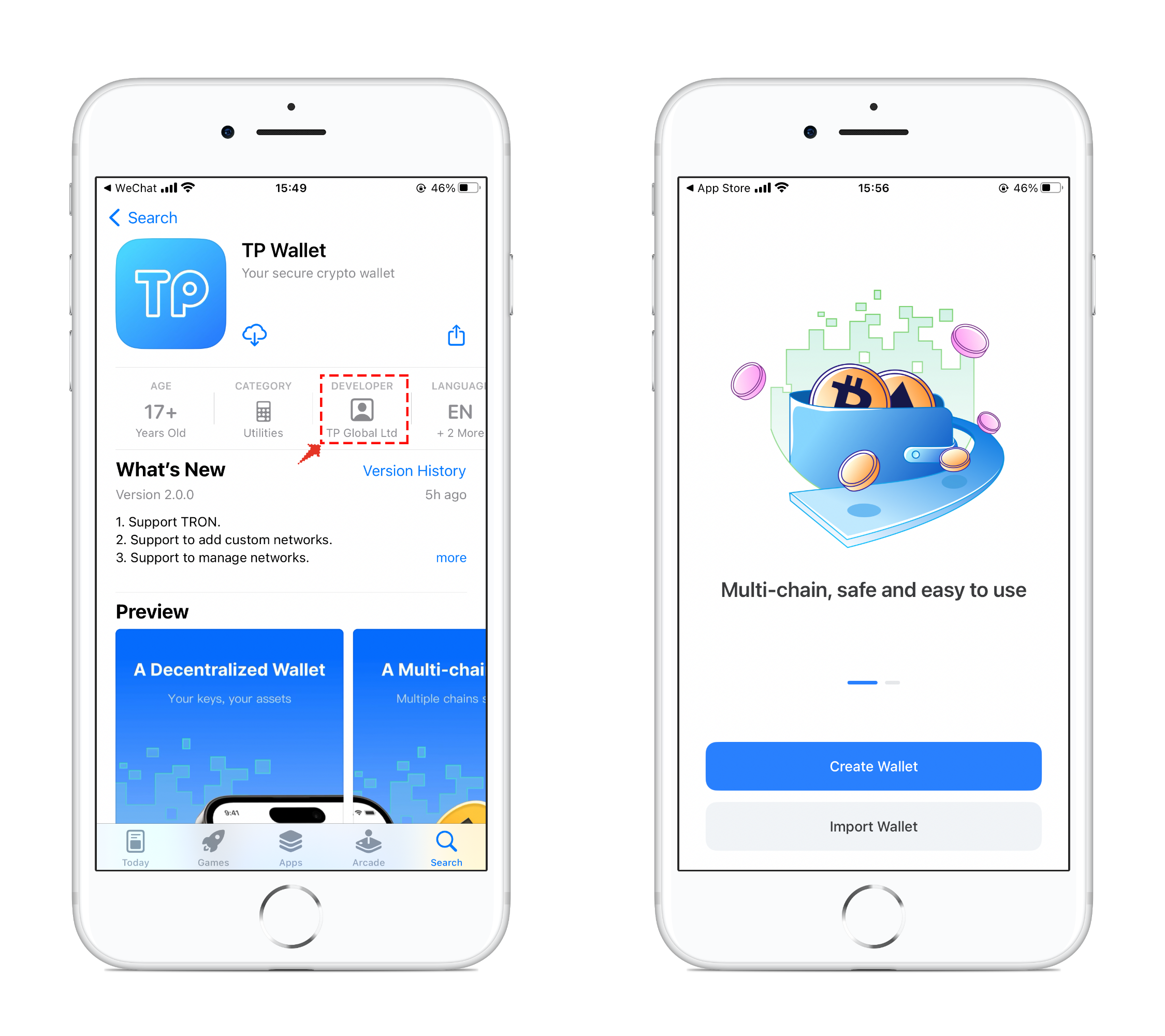
1、打开App Store，要用<mark style="color:blue;">**非大陆ID登录**</mark>。点击右下角搜索，在搜索栏搜索<mark style="color:blue;">**TP Wallet**</mark>，查看搜索结果。打开TP Wallet <mark style="color:blue;">**查看详情**</mark>。

![](https://261497644-files.gitbook.io/~/files/v0/b/gitbook-x-prod.appspot.com/o/spaces%2F-MMF2k4MCaxErpZyah2d%2Fuploads%2FLxa7BoYqxX0vUm9LMEQX%2F1.png?alt=media\&token=0065b495-ffb4-424f-a6c0-ca28adda8b89)

2、在详情界面中，可以查看到开发商信息：TP Global Ltd，只有这个开发商才是唯一的TokenPocket官方版本，那么你使用的钱包就是正版的。<mark style="color:red;">**（2022年10月8日之前在App Store中下载的开发商为：TOKENPOCKET FOUNDATION LTD**</mark> <mark style="color:red;">**是TokenPocket开发的早期版本，也是正版钱包可以正常的使用，后续将暂停更新服务。）**</mark>

<figure><img src="https://261497644-files.gitbook.io/~/files/v0/b/gitbook-x-prod.appspot.com/o/spaces%2F-MMF2k4MCaxErpZyah2d%2Fuploads%2FLByQFgbUJNzVZxSRW3NB%2F2.png?alt=media&#x26;token=341819b6-e7ec-439d-8c1f-379e0fdec3a0" alt=""><figcaption></figcaption></figure>


---

# Agent Instructions: Querying This Documentation

If you need additional information that is not directly available in this page, you can query the documentation dynamically by asking a question.

Perform an HTTP GET request on the current page URL with the `ask` query parameter:

```
GET https://help.tokenpocket.pro/cn/security-knowledge/protective-measures/appstore.md?ask=<question>
```

The question should be specific, self-contained, and written in natural language.
The response will contain a direct answer to the question and relevant excerpts and sources from the documentation.

Use this mechanism when the answer is not explicitly present in the current page, you need clarification or additional context, or you want to retrieve related documentation sections.