# TokenPocket带您一文玩转EthereumFair（ETHF）

## 如何在TokenPocket创建 EthereumFair 公链。

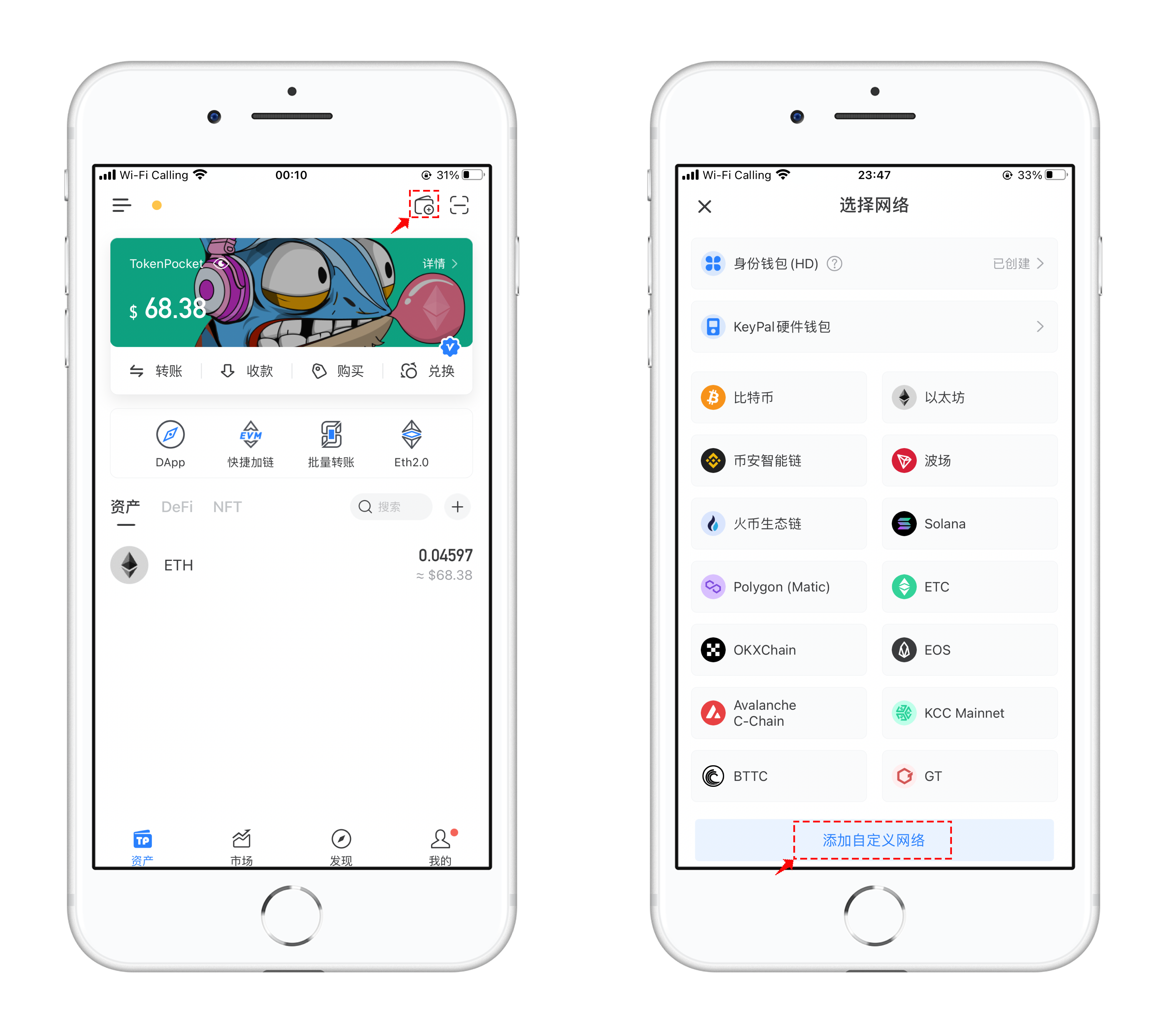
1、打开TokenPocket，点击右上角![](https://261497644-files.gitbook.io/~/files/v0/b/gitbook-x-prod.appspot.com/o/spaces%2F-MMF2k4MCaxErpZyah2d%2Fuploads%2FFflSb5PpqlBKpBa7r1Rv%2Fimage.png?alt=media\&token=703bb3b7-ff64-4c3f-8d2e-f67115c7d392)添加钱包，在【选择网络】界面中点击最下方的【添加自定义网络】

<figure><img src="https://261497644-files.gitbook.io/~/files/v0/b/gitbook-x-prod.appspot.com/o/spaces%2F-MMF2k4MCaxErpZyah2d%2Fuploads%2FG3jTy2HCgMFKliALZREd%2F1.png?alt=media&#x26;token=bae43f6d-2ac7-4d21-bccc-39f5b4d1c2b3" alt=""><figcaption></figcaption></figure>

2、打开自定义网络界面，点击右上角【便捷入口】，TokenPocket会针对比较热门的公链进行收录，通过便捷入口就可以很方便的搜索到自己需要添加的公链。

在搜索栏中填入ETF简称，可以看到下方的搜索结果，点击准备添加。

<figure><img src="https://261497644-files.gitbook.io/~/files/v0/b/gitbook-x-prod.appspot.com/o/spaces%2F-MMF2k4MCaxErpZyah2d%2Fuploads%2F1BMI1hsL16uBbhlamyu8%2F2.png?alt=media&#x26;token=d9c65a60-d8b7-4a2a-8d38-4aefbd5acd69" alt=""><figcaption></figcaption></figure>

3、核对信息后点击右下角的【保存】，即可添加成功。回到选择网络界面，下拉到最底部可以看到新添加的EthereumFair网络。

<figure><img src="https://261497644-files.gitbook.io/~/files/v0/b/gitbook-x-prod.appspot.com/o/spaces%2F-MMF2k4MCaxErpZyah2d%2Fuploads%2F1vsfiVbJxCwHOyJX5DB8%2F3.png?alt=media&#x26;token=dadb2c9c-1754-4564-9b67-71de19391532" alt=""><figcaption></figcaption></figure>

4、点击新增加的EthereumFair 公链，可以选择【创建】或【导入】方式使用ETF钱包，导入后就可以看到自己收到的ETF空投。

<figure><img src="https://261497644-files.gitbook.io/~/files/v0/b/gitbook-x-prod.appspot.com/o/spaces%2F-MMF2k4MCaxErpZyah2d%2Fuploads%2FnTW2b6pYfaMWxh7JQBY3%2F4.png?alt=media&#x26;token=1672e5d5-3d7e-49b8-beb2-d8be35fd6b49" alt=""><figcaption></figcaption></figure>

5、添加完ETF公链后，可以使用持有ETH的钱包地址进行同步，打开TokenPocket，点击【详情】，选择【钱包同步】，选择ETF公链同步后切换到ETF钱包即可。

<figure><img src="https://261497644-files.gitbook.io/~/files/v0/b/gitbook-x-prod.appspot.com/o/spaces%2F-MMF2k4MCaxErpZyah2d%2Fuploads%2FSEwbq3a51yG8rOXksMxp%2F1e97f355db839fa9939135b57f7a4a1.png?alt=media&#x26;token=e361654e-43a8-42f7-95c7-ef63f02dc14b" alt=""><figcaption></figcaption></figure>


---

# Agent Instructions: Querying This Documentation

If you need additional information that is not directly available in this page, you can query the documentation dynamically by asking a question.

Perform an HTTP GET request on the current page URL with the `ask` query parameter:

```
GET https://help.tokenpocket.pro/cn/wallet-operation/create-wallet-tutorial/etf.md?ask=<question>
```

The question should be specific, self-contained, and written in natural language.
The response will contain a direct answer to the question and relevant excerpts and sources from the documentation.

Use this mechanism when the answer is not explicitly present in the current page, you need clarification or additional context, or you want to retrieve related documentation sections.