> For the complete documentation index, see [llms.txt](https://help.tokenpocket.pro/en/llms.txt). Markdown versions of documentation pages are available by appending `.md` to page URLs; this page is available as [Markdown](https://help.tokenpocket.pro/en/wallet-faq-en/bsc/bnbchain.md).
# BSC Wallet Creation/Import Tutorial
This is a tokenpocket wallet tutorial, and also a binance chain wallet tutorial, guide to creating and importing BSC wallets in Tokenpocket.
## How to Create and Import BSC Wallet?
This guide provides a simple, step-by-step walkthrough on how to create and import a BSC wallet using [TokenPocket](https://www.tokenpocket.pro/). Whether you're a new or existing user, you'll learn everything from selecting the right network to securely backing up your private keys, ensuring a smooth and safe start to your BSC journey.
***
### **Part 1: Creat BSC Wallet**
If you don't have a BSC wallet or BSC USDT wallet yet, follow our guide to create one first.
{% stepper %}
{% step %}
#### **Open TokenPocket**
* **For New Users Creating a Wallet:**
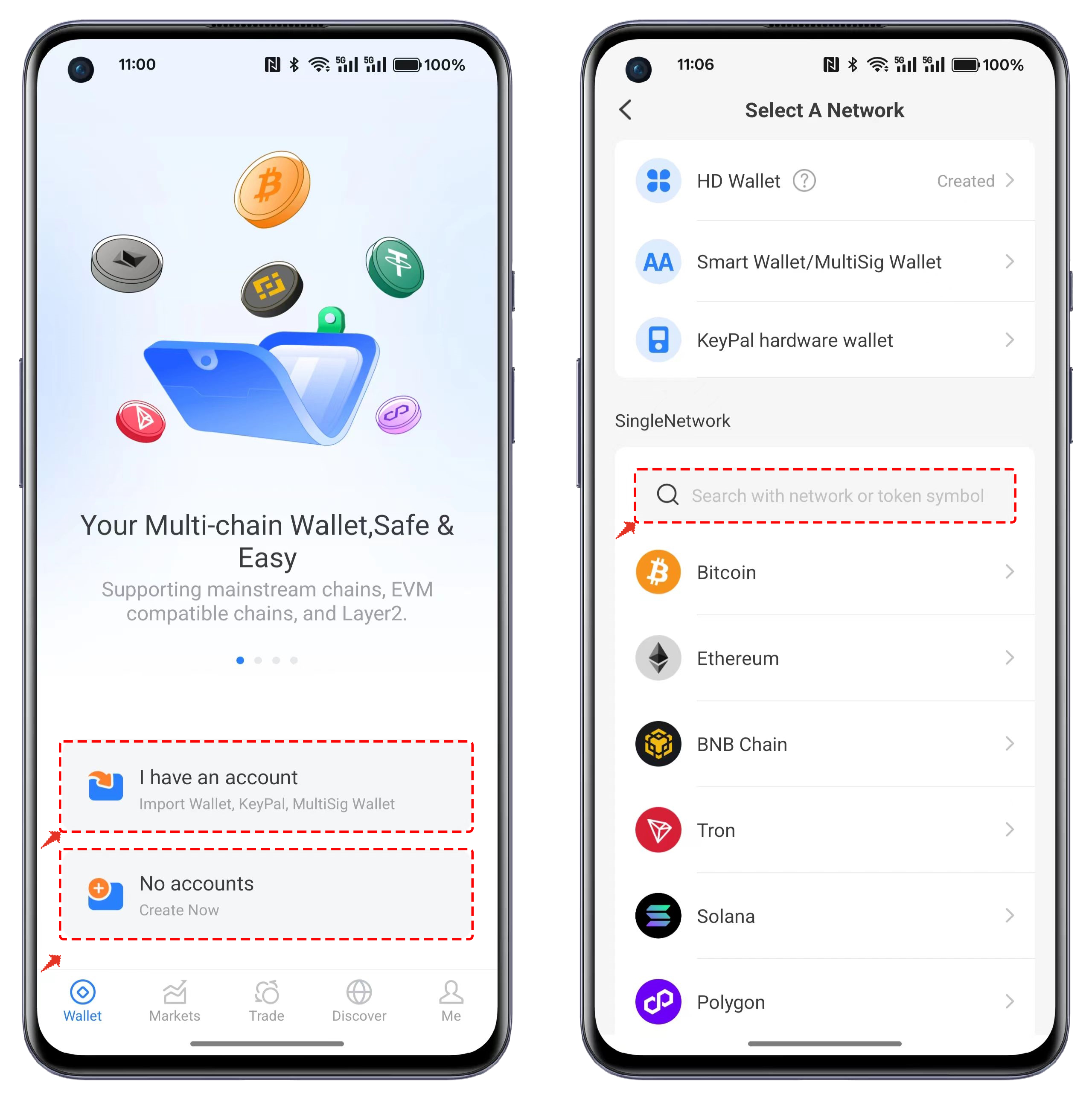
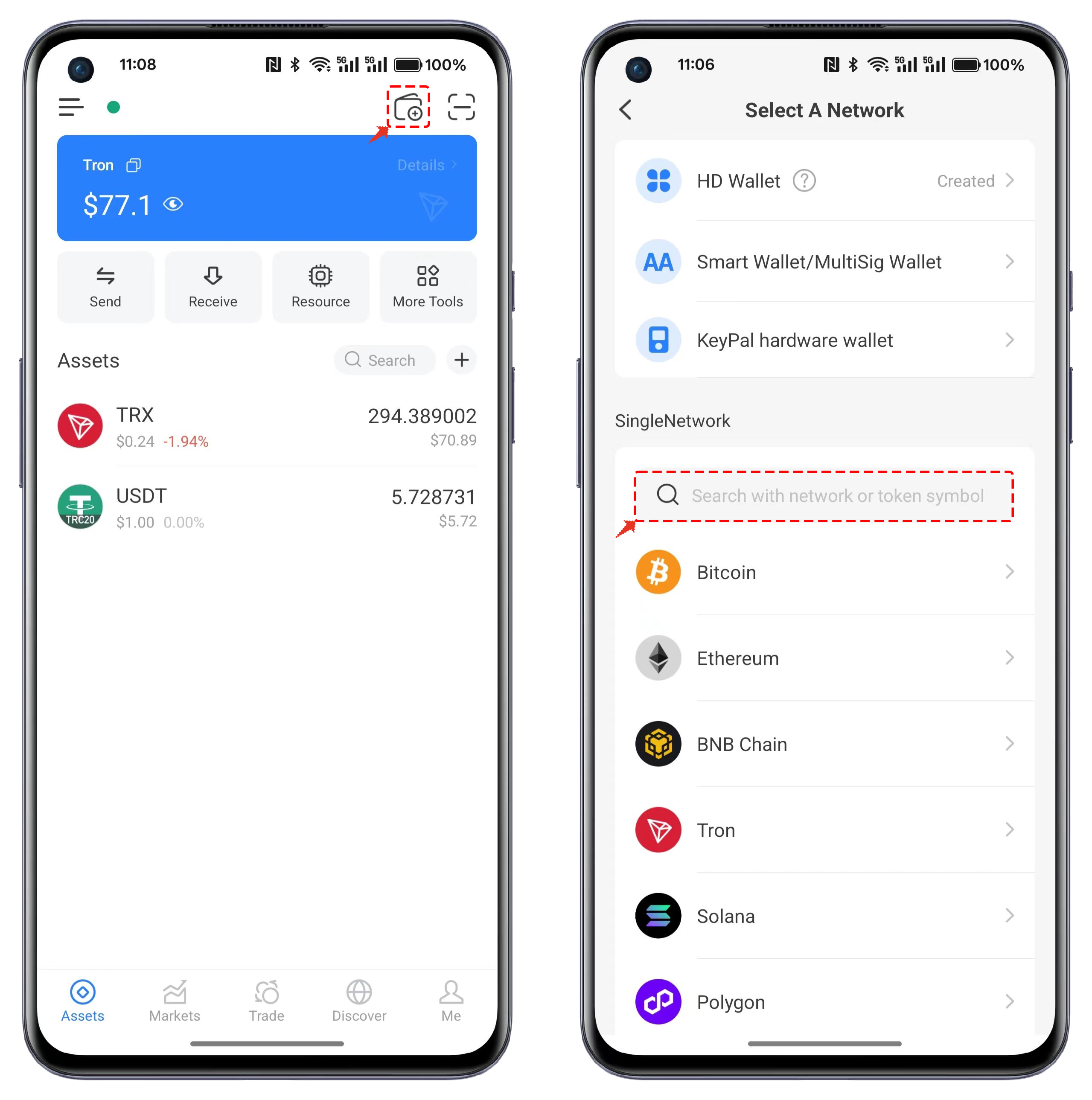
Download and open your TokenPocket. On the initial interface, you can choose between \[I have an account] or \[No accounts] to create or import a wallet. When selecting the wallet network (blockchain), you can either directly select or search for the desired network to proceed with creation/import.
* **For Existing Users Creating a Wallet:**
Open TokenPocket, click the first entry \[Create Wallet] in the top right corner of the interface. When selecting the wallet network (blockchain), you can either directly select or search for the desired network to proceed with creation/import.
{% endstep %}
{% step %}
#### **Select Wallet Network**
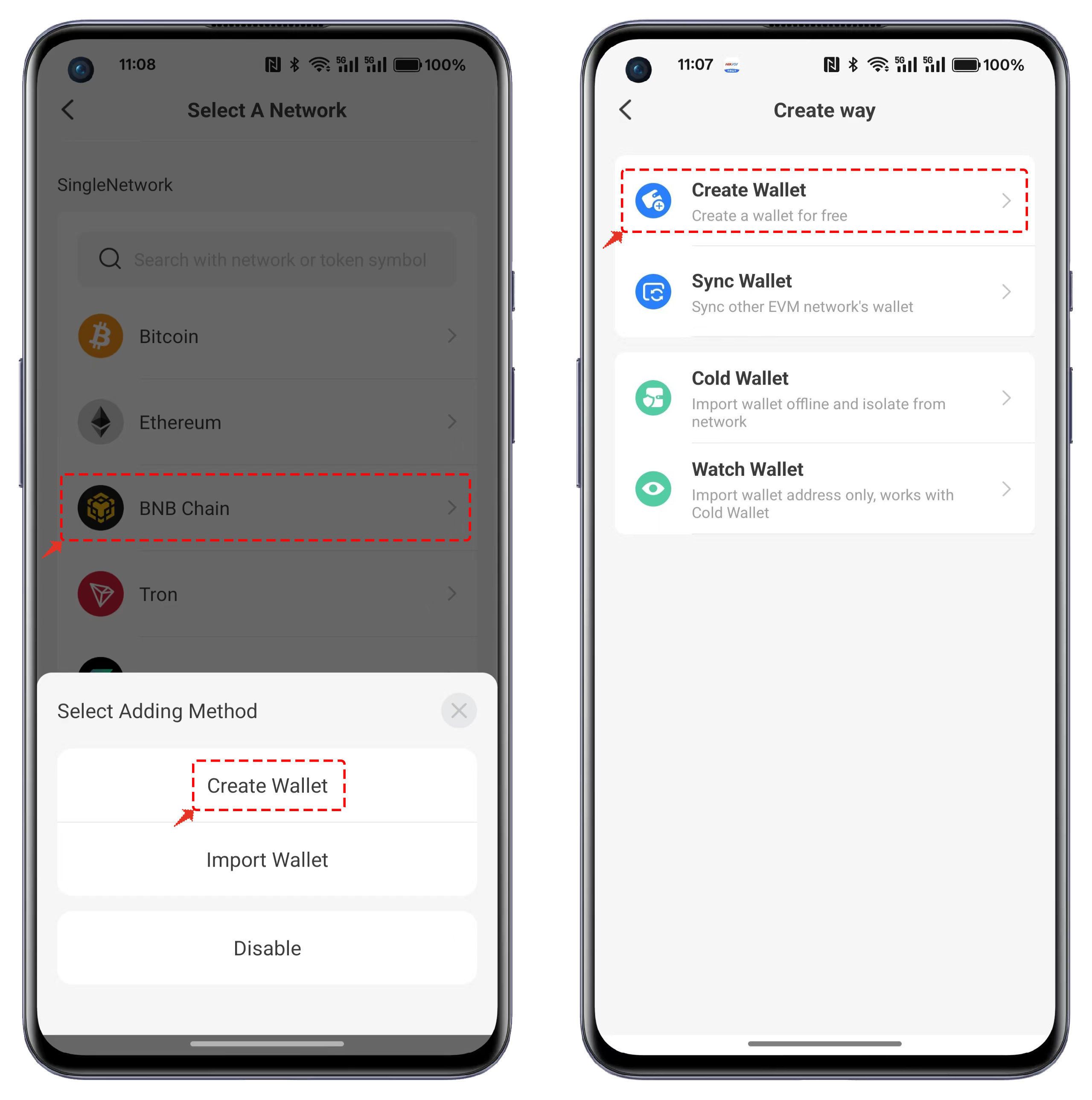
Choose \[BNB Chain] in the wallet network selection and click \[Create Wallet]. In the creation method, select \[Create Wallet].
{% endstep %}
{% step %}
#### **Set Wallet Details**
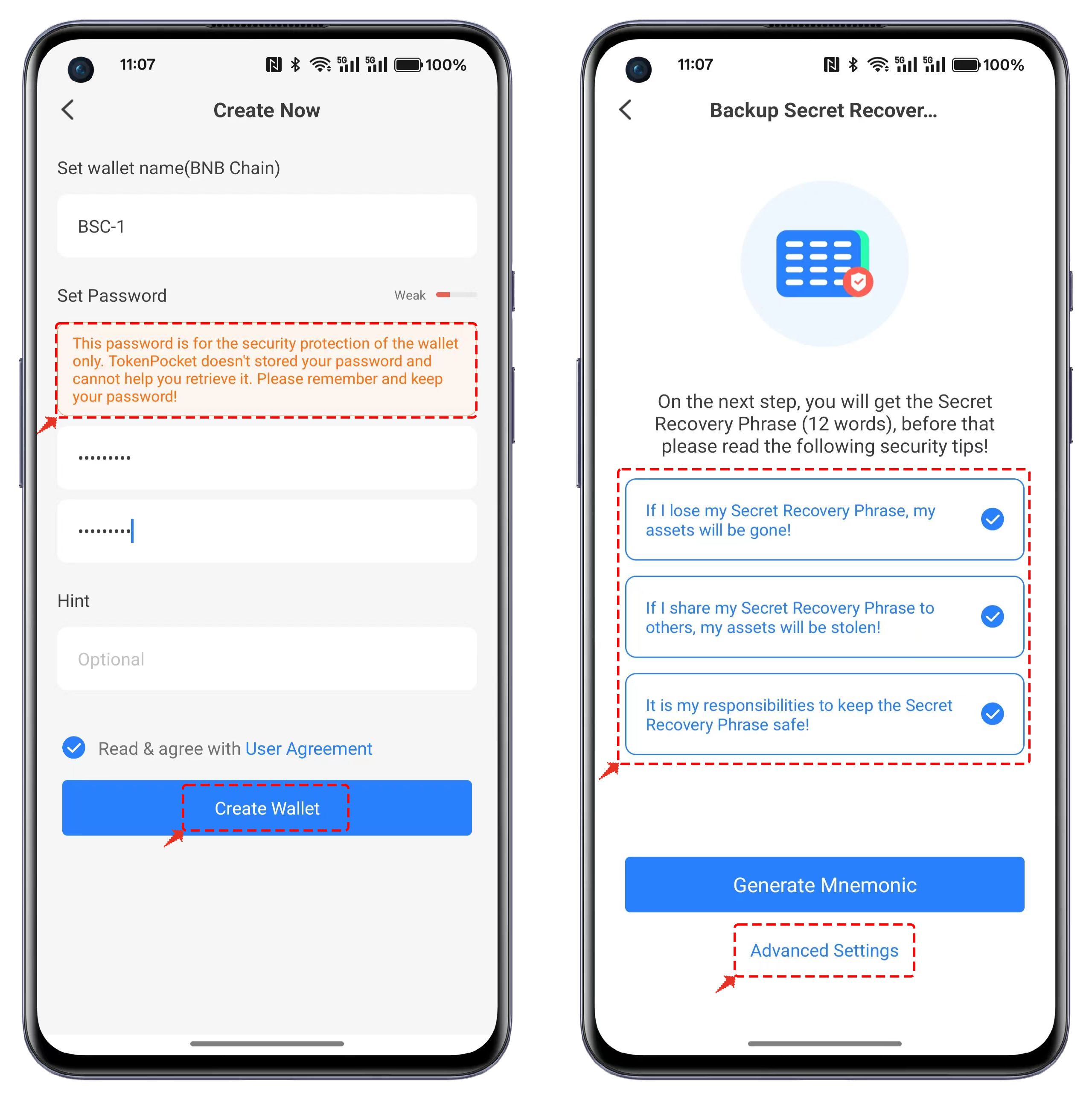
Enter the wallet name, password, and optional hint information, then click \[Create Wallet]. On the mnemonic phrase backup page, carefully review the security tips and ensure to save the mnemonic phrase using offline methods.
{% hint style="success" %}
Click \[Advanced Settings] to enable the [Passphrase](https://help.tokenpocket.pro/en/security-knowledge/security-measure/passphrase) option for wallet creation. If not needed, directly click \[Generate Mnemonic].
{% endhint %}
{% endstep %}
{% step %}
#### Mnemonic Phrase Backup
On the mnemonic phrase backup page, ensure to back up the displayed mnemonic phrase offline. After completing the backup, click \[Backup Complete, Proceed to Verification].
{% hint style="warning" %}
If using the [Passphrase](https://help.tokenpocket.pro/en/security-knowledge/security-measure/passphrase) feature, make sure to remember it. Only the correct mnemonic phrase combined with the correct Passphrase can import the correct wallet.
{% endhint %}
> **Recommend:** [What is the private key, mnemonic and wallet password](https://help.tokenpocket.pro/en/blockchain-basics/what-is-the-private-key-mnemonic-and-wallet-password)
> {% endstep %}
{% step %}
#### **Verify Mnemonic Phrase**
On the verification page, you will see 12 shuffled words. Arrange them in the correct order to pass the verification. Once verified, the BSC wallet will be successfully created.
{% hint style="danger" %}
**Attention:**Do not share your private keys or recovery phrases with others, as doing so may result in the loss of your assets!
{% endhint %}
{% endstep %}
{% endstepper %}
### **Part 2: Import BSC Wallet**
{% stepper %}
{% step %}
#### **Open TokenPocket**
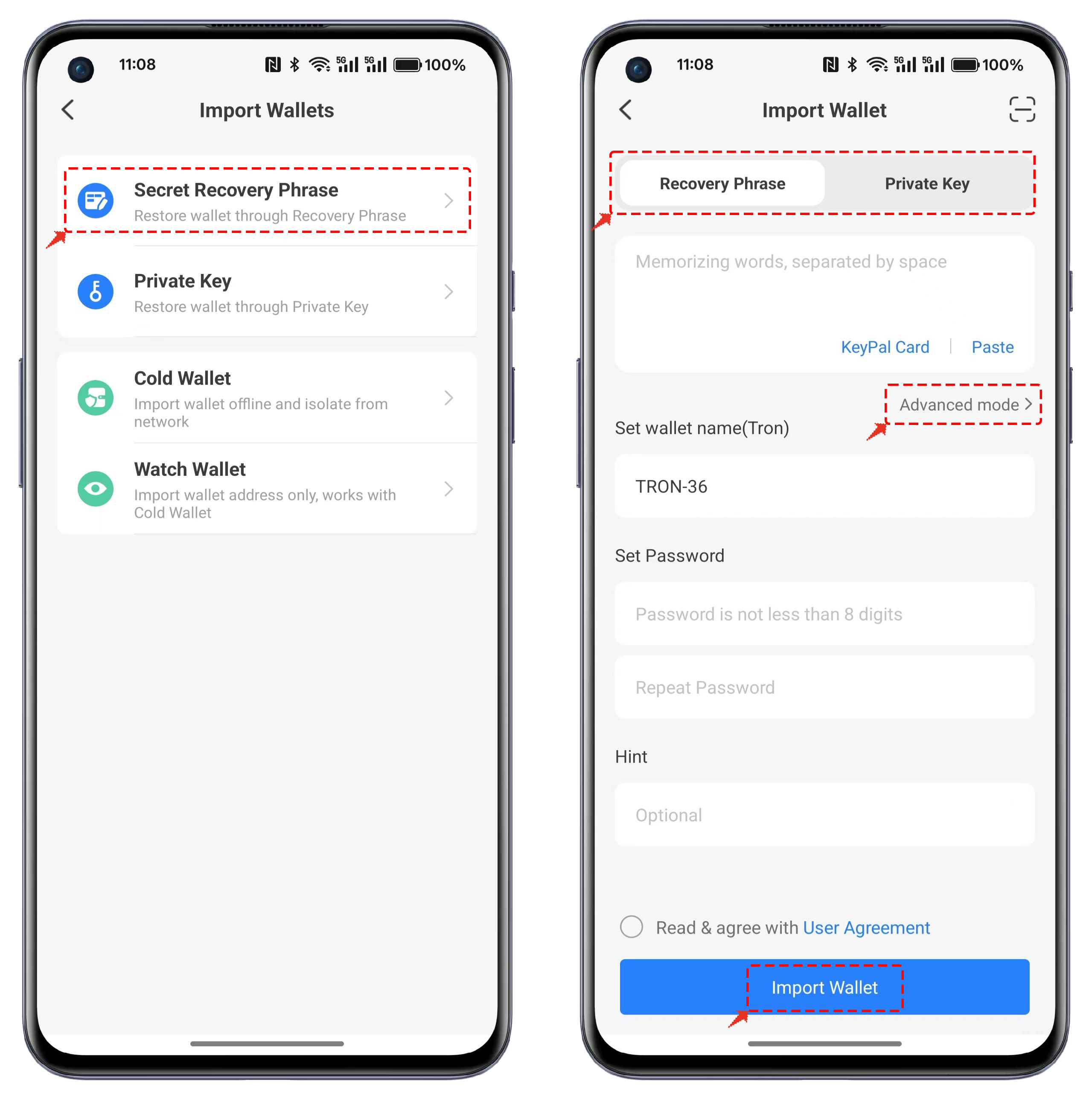
Click the first entry \[Create Wallet] in the top right corner of the interface. Select Binance Smart Chain in the wallet network and click \[Import Wallet].
{% endstep %}
{% step %}
#### **Choose Import Method**
You can choose to import via mnemonic phrase or private key. You can also switch between these methods on the import interface. Ensure you input your mnemonic phrase or private key in a secure environment to prevent theft by malicious tools.
{% hint style="info" %}
If you have set a [Passphrase](https://help.tokenpocket.pro/en/security-knowledge/security-measure/passphrase), click \[Advanced mode].
{% endhint %}
{% endstep %}
{% step %}
#### **Enter Passphrase (If Applicable)**
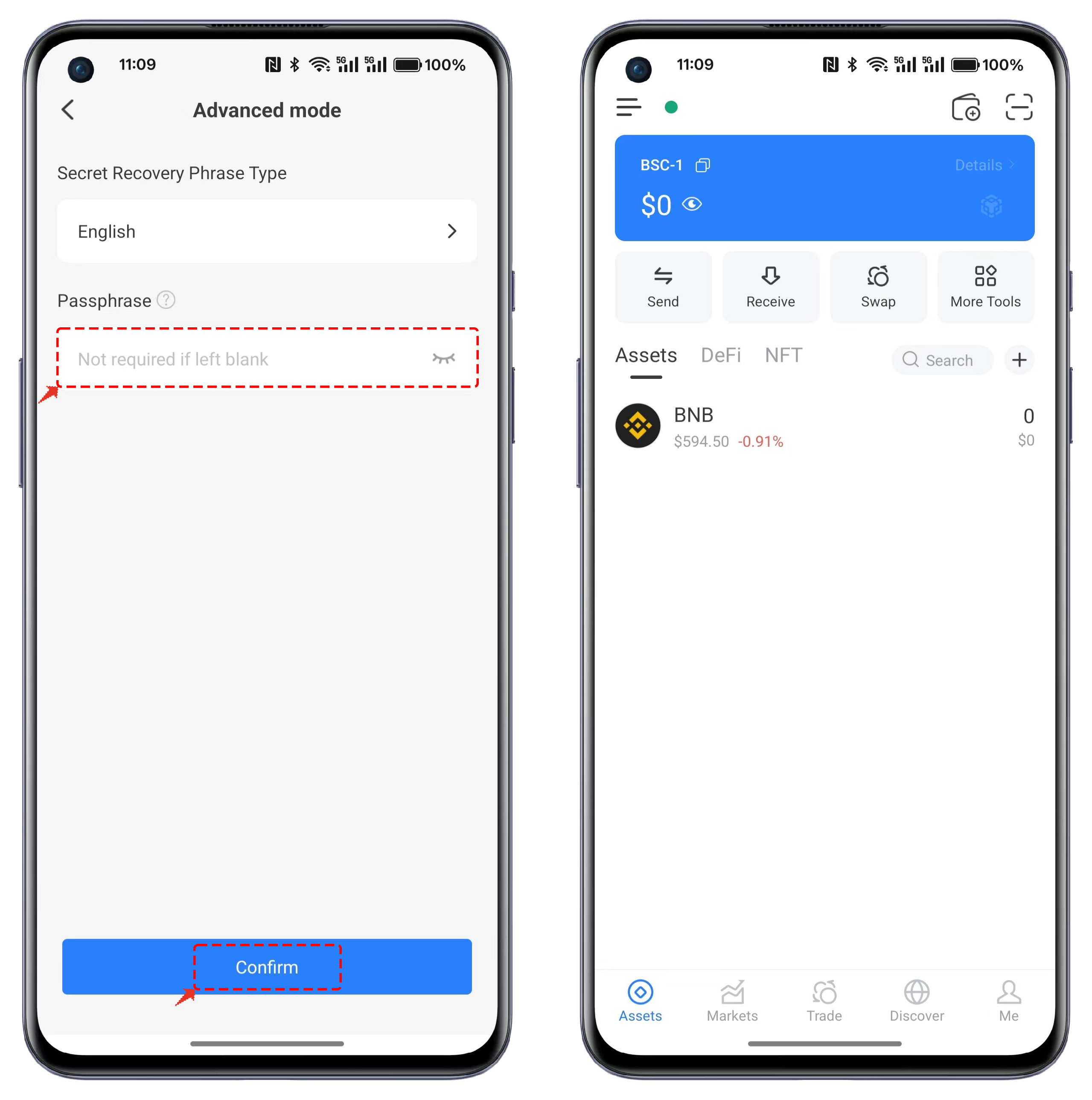
In Advanced Settings, enter the correct [Passphrase](https://help.tokenpocket.pro/en/security-knowledge/security-measure/passphrase), click Confirm, and import it into the wallet. This completes the import process for the BSC wallet.
{% endstep %}
{% endstepper %}
***
### FAQs About BSC Wallet
#### 1. What is a BSC wallet?
A BSC wallet is a self-custody crypto wallet that supports BNB Smart Chain (BSC)—the EVM-compatible network used for BEP-20 tokens and BSC dApps.\
Why[ TokenPocket](https://www.tokenpocket.pro/)? It’s a trusted multi-chain wallet with a built-in dApp browser, swap/bridge, and easy BSC setup—great for holding, swapping, and using BEP-20 assets.
#### 2. How can I get my BSC wallet address?
1. Download TokenPocket (iOS/Android) and create or import a wallet.
2. Click \[Me] → \[Manage Wallets] → \[BNB Chain]
#### 3. Is BNB the same as BSC?
No, BNB and BSC are not the same thing, though they are closely related. It's a common point of confusion due to their history and recent rebranding. Here's a simple breakdown:
* BNB is the native cryptocurrency of the BNB Chain ecosystem. It's the "gas" token used to pay for transactions and smart contract execution on the network. Think of it like ETH is to Ethereum.
* BSC (Binance Smart Chain), now officially known as BNB Smart Chain, is the blockchain network itself. It's the platform where you can build and use decentralized applications (dApps), and where transactions for BEP-20 tokens (a token standard similar to Ethereum's ERC-20) take place.
{% hint style="info" %}
**Note:** [BNB Chain](https://www.bnbchain.org/en) generally refers to BNB Smart Chain and BNB Beacon Chain collectively.
{% endhint %}
#### 4. Is the BSC wallet address the same as BNB?
Not exactly—it depends on the network:
* BSC (BEP-20) address: starts with 0x (same format as Ethereum).
* Beacon Chain (BEP-2) address: starts with bnb and often requires a memo on exchanges.\
Use the address that matches the network you selected. In TokenPocket, choose BNB Smart Chain (BSC) for BEP-20; choose BNB Beacon Chain for BEP-2. Sending to the wrong network can lead to loss of funds.
***
### Conclusion
Now that you know how to create and import a BSC wallet with [TokenPocket](https://www.tokenpocket.pro/), you're ready to explore the vast world of decentralized applications on the BNB Chain. Remember, the most critical step is always to secure your mnemonic phrase and private keys. Keep them offline and safe from prying eyes to ensure the security of your assets. With your new wallet, you can now seamlessly engage with DeFi, dApps, and the entire BSC ecosystem.
{% hint style="info" %}
#### **Disclaimer**
Cryptocurrency investment and usage involve market, legal, and technical risks. Please exercise caution. Always keep your seed phrases and private keys secure and never disclose them to anyone. This article is for educational purposes only and does not constitute investment advice. Before using wallets, conduct your own research and ensure compliance with local laws and regulations.
{% endhint %}