> For the complete documentation index, see [llms.txt](https://help.tokenpocket.pro/en/llms.txt). Markdown versions of documentation pages are available by appending `.md` to page URLs; this page is available as [Markdown](https://help.tokenpocket.pro/en/wallet-faq-en/bsc/how-to-create-bsc-multisig-wallet.md).
# How to Create a BSC MultiSig Wallet?
Learn how to create a secure, multisig wallet on TokenPocket, and also share more using tips for multisig wallet.
## **How to Create a BSC MultiSig Wallet on TokenPocket?**
As a leading Web3 wallet, [TokenPocket](https://www.tokenpocket.pro/) deeply understands the importance of security. This guide will walk you through the process of setting up a secure BSC (Binance Smart Chain) MultiSig wallet on TokenPocket. BSC, as an Ethereum Virtual Machine (EVM)-compatible blockchain, supports standard multi-signature smart contracts, ensuring your crypto assets no longer rely on a single point of trust, but will be safeguarded by you and your team together.
{% hint style="success" %}
**Tips:** BSC MultiSig wallets are implemented based on smart contracts and offer the following advantages and use cases:
* Manage assets by multiple persons to avoid the misappropriation of assets by individuals
* Perform multi-address signature management for assets to enhance asset security
* Suitable for enterprises, DAO organizations, and other scenarios requiring multiple approvals
* BSC network has relatively low Gas fees, making it more cost-effective to create and use MultiSig wallets
{% endhint %}
### **Part 1: Steps to Create BSC MultiSig Wallet**
{% stepper %}
{% step %}
#### Download and Open TokenPocket
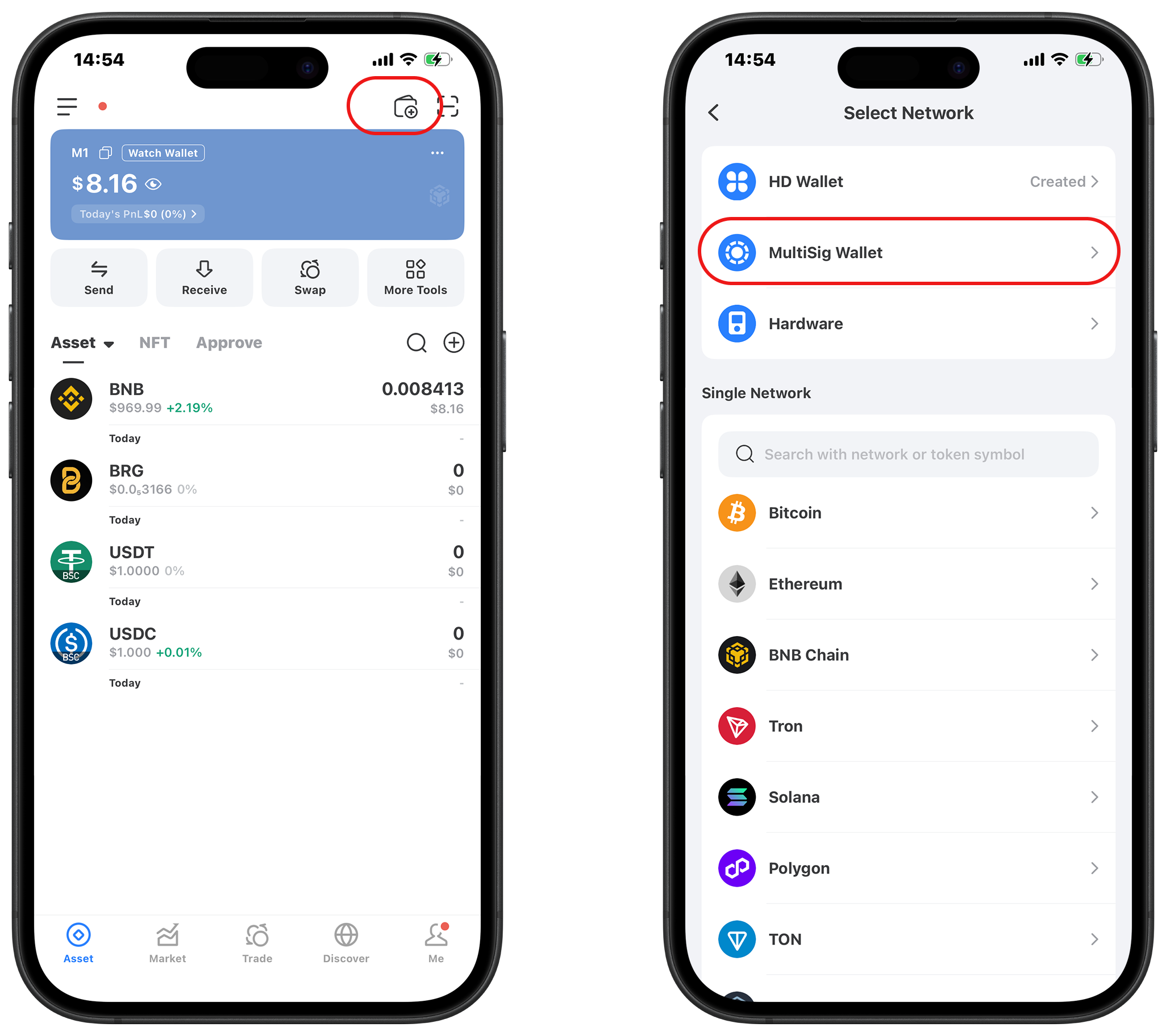
Download and open [TokenPocket](https://www.tokenpocket.pro/), select the 「Wallet」 icon in the top-right corner, then tap 「MultiSig Wallet」.
{% endstep %}
{% step %}
#### Select BSC Network
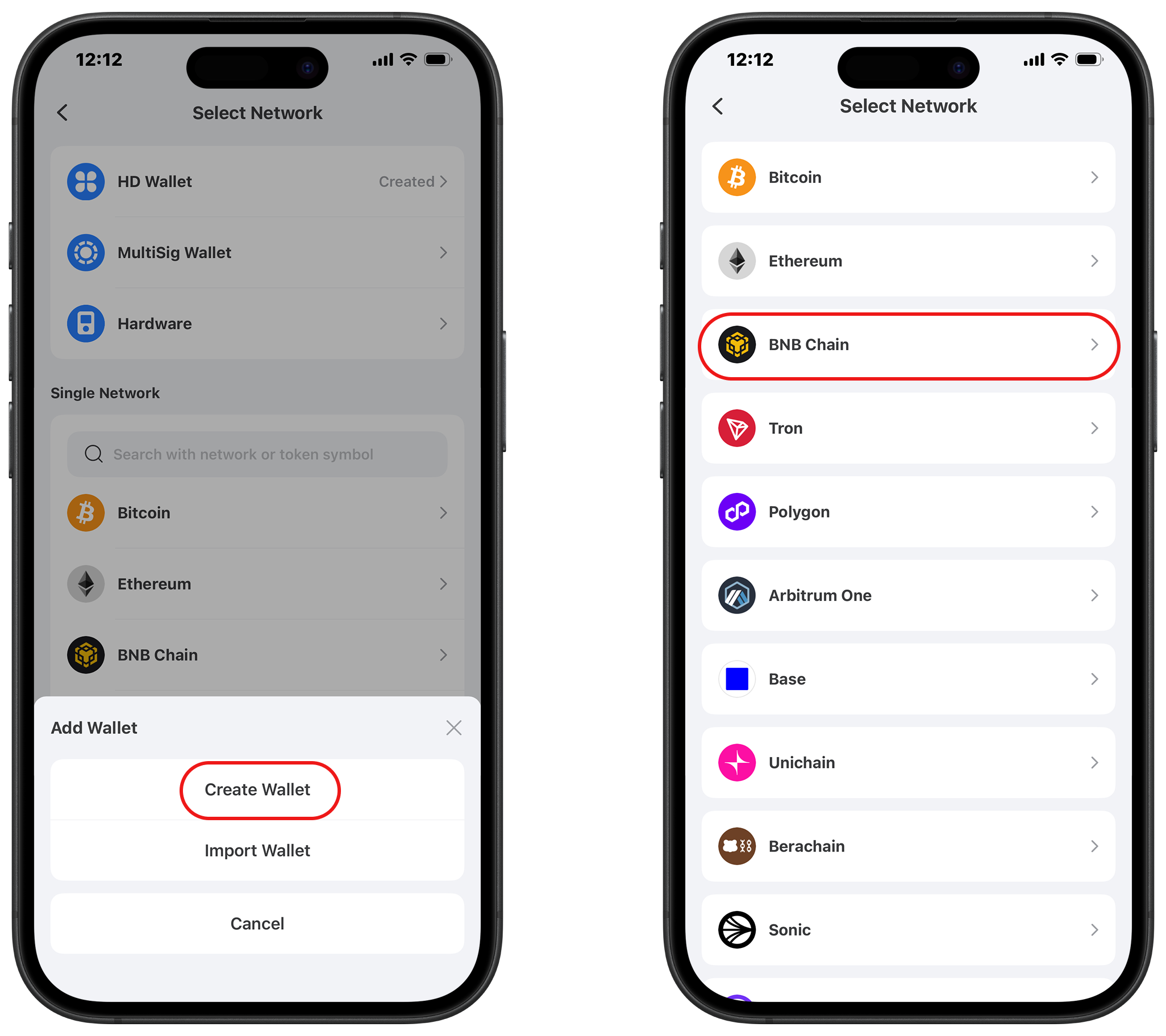
Find the BSC network from all available networks and select the BSC network.
{% endstep %}
{% step %}
#### Enter Information
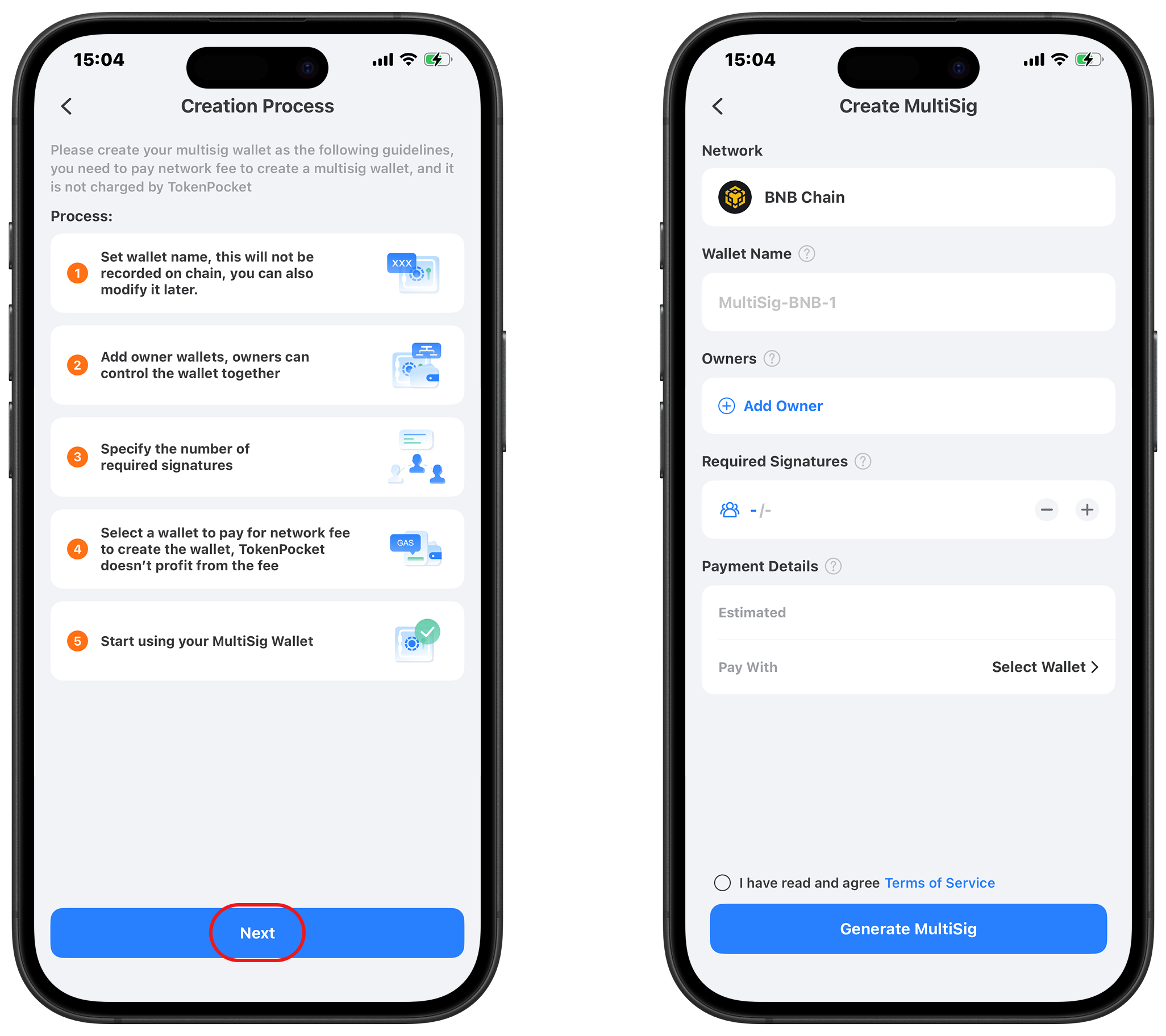
Please read the reminders carefully during the creation process and then click \[Next Step]. Next, configure your BSC multisig wallet based on the definitions and functions of the following information:
* **Wallet Name:** is as same as the wallet name you created before, which can be customized and it won't be recorded on chain.
* **Set Management Wallets:** Set the managers of the BSC multisig wallet. Owners can manage and control the multisig wallet, and a maximum of 30 owners can be set, which can be understood as the \[Threshold Setting] of the multisig wallet. Owners can be set up flexibly, suitable for enterprises, DAO, and individuals.
* **Required Signatures:** Also called Weight. As an EVM-compatible chain, BSC multisig wallets' weights can only be set as number 「1」, meaning at least 1 signature is required to execute a transaction. You can set the required number of signatures according to your actual needs (e.g., 2/3, 3/5, etc.).
* **Payment Details:** The BSC multisig scheme is a smart contract, so creating a multisig wallet requires paying BNB as Gas (miner's fee), which TokenPocket does not charge. BSC network has relatively low Gas fees, making the creation cost more economical.
* **Pay with:** You can click and select the BSC wallet address imported in the wallet to pay the Gas (miner's fee) fee. Make sure the wallet has sufficient BNB to pay for the Gas fee required to create the multisig wallet.
{% endstep %}
{% step %}
#### Complete MultiSig Wallet Creation
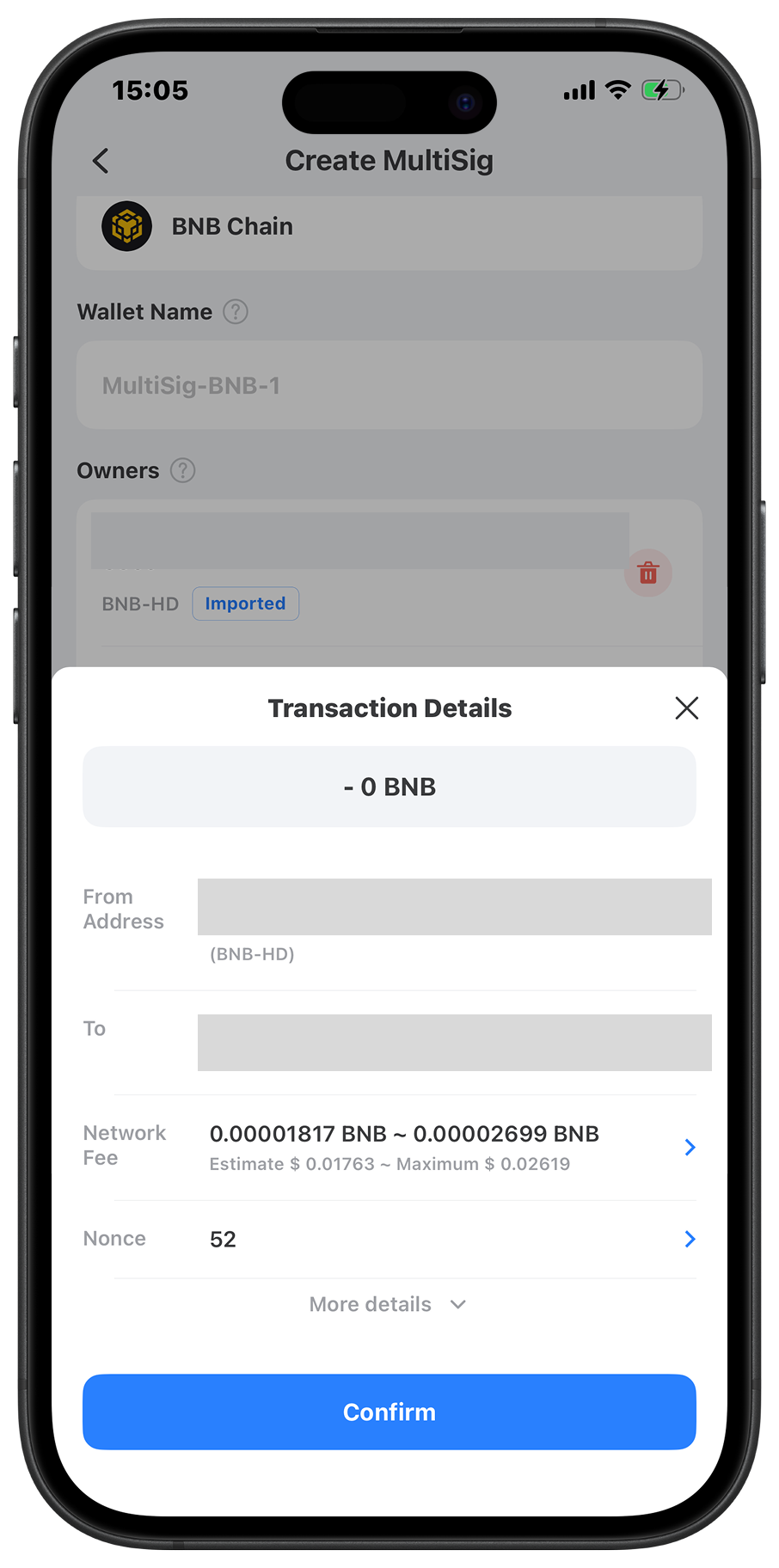
After everything is set, click \[Generate MultiSig] to read the reminders for the creation of the multisig wallet. After confirming your information, the BSC multisig wallet creation is complete.
{% endstep %}
{% endstepper %}
***
### Part 2: More Tips for BSC MultiSig Wallet
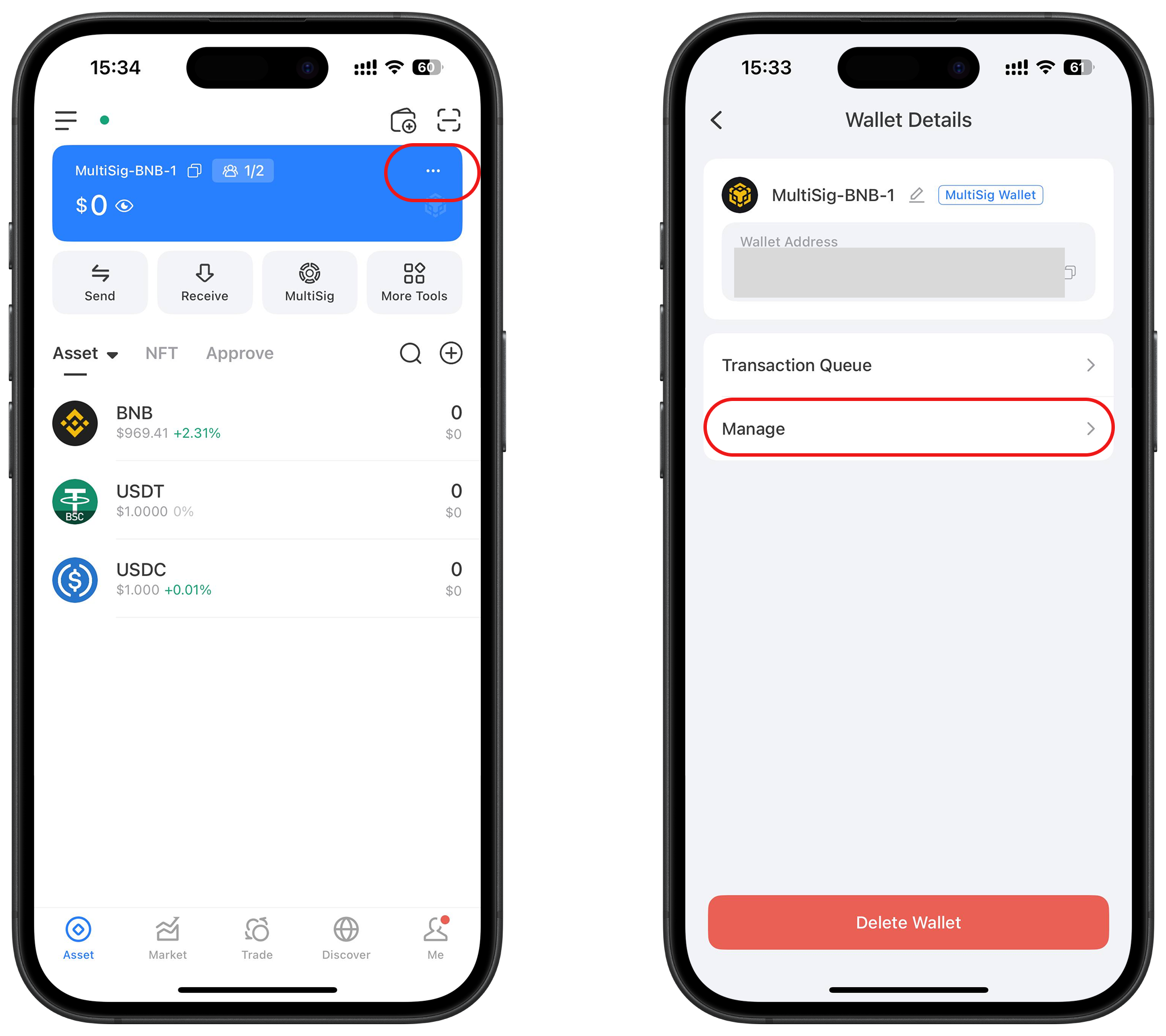
After you've successfully created a BSC multisig wallet, click \[Details] and you can see the \[Transaction Queue] and \[Manage].
* **Transaction Queue:** This function will display the generated multisig orders, you can click and complete the orders;
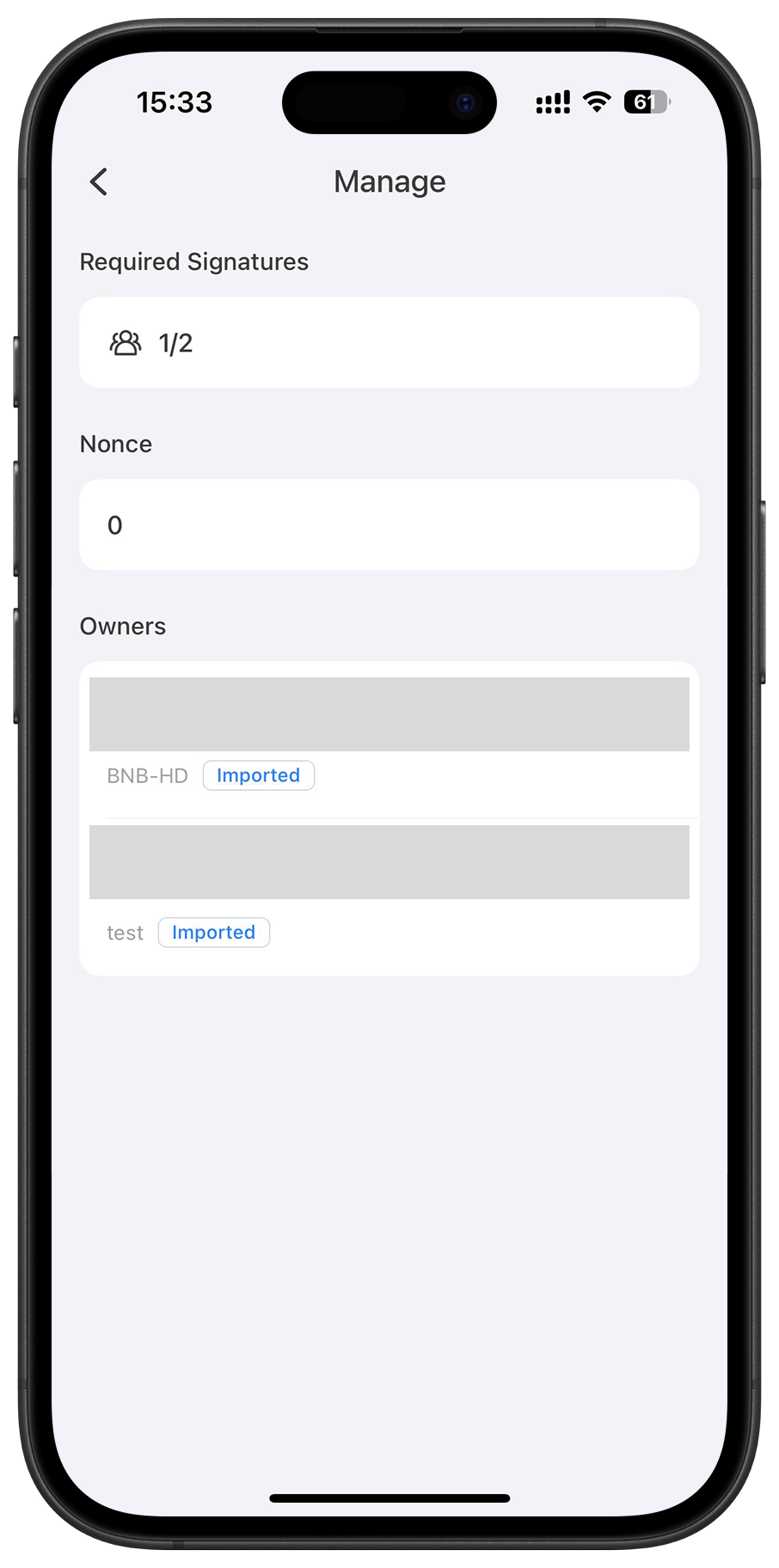
* **MultiSig Management:** You can view information such as \[Required signatures], \[Latest Nonce on-chain], and \[Associated Wallet] in \[Manage]. The associated wallet is the wallet owners. If there is an address that has not been imported, you can click \[Import] and use the private key or secret recovery phrase to import it. Whether the associated wallet is imported will affect transactions and the use of DApps.
***
### FAQs about How to Create a BSC MultiSig Wallet
#### **1. How to tell if a wallet is multisig?**
A multi-signature (multi-sig) wallet is defined by its core security feature: it requires more than one private key signature to authorize a transaction. You can tell if a wallet is multi-sig by checking its settings or documentation, where it will specify the required number of signatures (e.g., 2-of-3 or 3-of-5).
#### **2. Which wallets support BSC multisig?**
Many of the top cryptocurrency wallets and platforms support BSC multi-sig functionality. A great example is [TokenPocket](https://www.tokenpocket.pro/), which provides multi-sign wallet support on BSC, Ethereum, and other EVM-compatible chains. This feature allows users to set up a secure wallet on the BSC network that requires multiple approvals for transactions, fully leveraging BSC's low Gas fee advantage.
#### 3.What is the best multi-sig wallet?
The "best" multi-sig wallet depends on your specific needs, focusing on security, network support, and ease of use. A top-tier wallet will offer a robust security framework and support multiple blockchains. Many users find that a multi-chain wallet like TokenPocket is a powerful choice for its combination of strong security, extensive network support, and a user-friendly interface that simplifies the management of secure, multi-signature assets.
{% hint style="success" %}
**Tips:** If you are looking forward a hardware wallet, [KeyPal](https://www.keypal.pro/) is the ultimate safeguard for your crypto assets, storing your private keys offline to shield you from all online threats.
{% endhint %}
***
### Conclusion
Now you know how to create a BSC multisig wallet on [TokenPocket](https://www.tokenpocket.pro/). The key point of creating a BSC multisig wallet is the reasonable setting of \[Owners] and \[Required signatures]. A reasonable set of the multisig wallet can play its maximum security and convenience. The commonly used multiple signatures are 2/3, 3/5, and so on, which need to be selected according to individual or team's actual needs. With its low Gas fees and EVM compatibility, the BSC network is an ideal choice for creating and using multisig wallets.
{% hint style="info" %}
#### Disclaimer
Cryptocurrency investment and usage involve market, legal, and technical risks. Please exercise caution. Always keep your seed phrases and private keys secure and never disclose them to anyone. This article is for educational purposes only and does not constitute investment advice. Before using wallets, conduct your own research and ensure compliance with local laws and regulations.
{% endhint %}