> For the complete documentation index, see [llms.txt](https://help.tokenpocket.pro/en/llms.txt). Markdown versions of documentation pages are available by appending `.md` to page URLs; this page is available as [Markdown](https://help.tokenpocket.pro/en/wallet-faq-en/btc-wallet/obtain-public-key.md).
# How to obtain a wallet public key
Find the BTC public key through TokenPocket.
### What is a BTC Public Key:
A public key is a core concept in cryptography and plays an important role in the Bitcoin network. It is a mathematical result generated from a private key using the Elliptic Curve Digital Signature Algorithm (ECDSA), specifically the secp256k1 curve.
**For more details:** [**What is a Public Key**](/en/wallet-faq-en/btc-wallet/public-key.md)
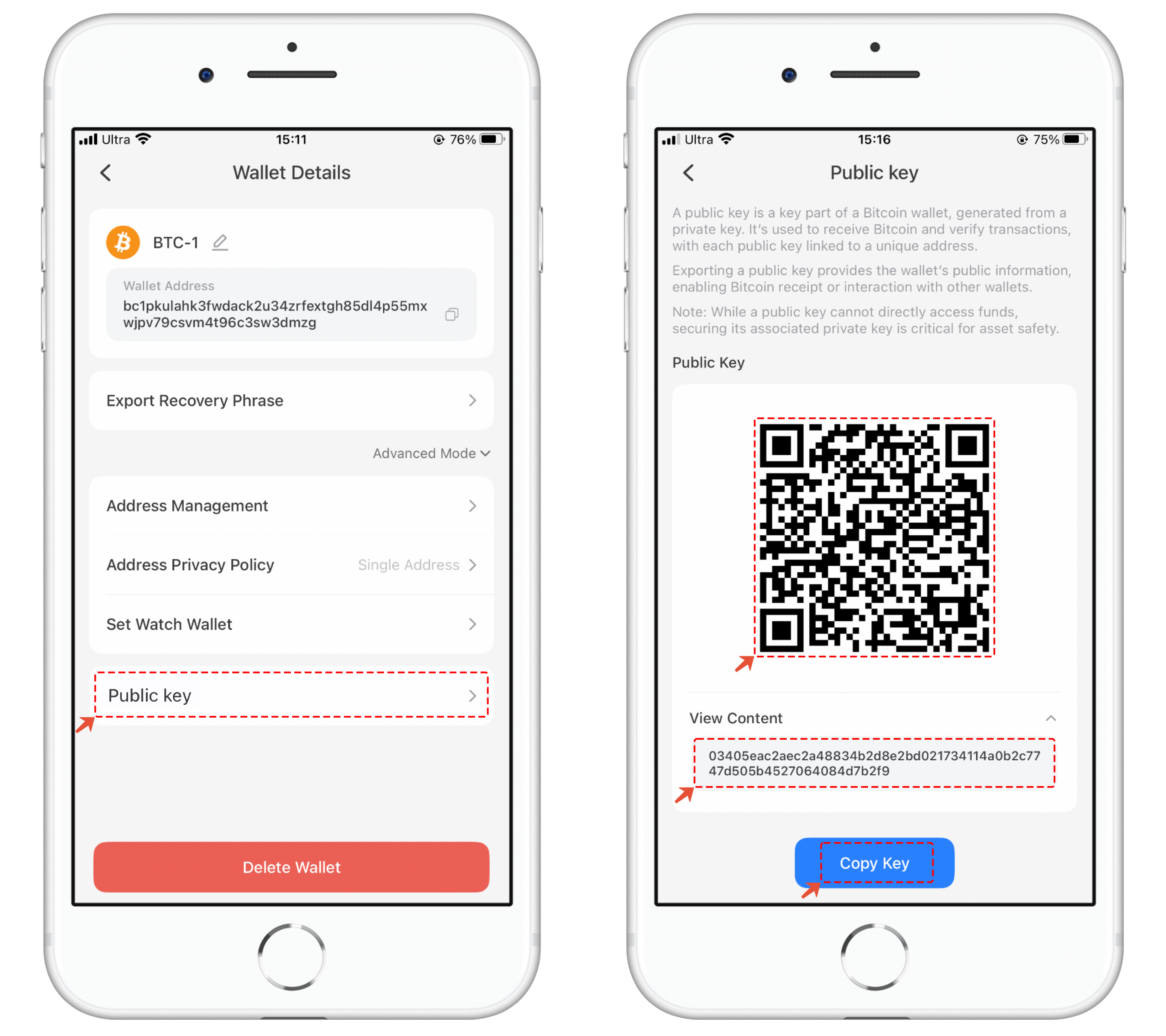
### To view the BTC wallet public key in TokenPocket:
1. Open TokenPocket and click on the \[Details] menu. In the wallet details, click on \[Advanced Mode].
2. Click on Advanced Mode and select \[Public Key]. You will see a QR code and its content related to the public key. Click to copy the BTC address public key, which can be used in a BTC multi-signature wallet.