> For the complete documentation index, see [llms.txt](https://help.tokenpocket.pro/en/llms.txt). Markdown versions of documentation pages are available by appending `.md` to page URLs; this page is available as [Markdown](https://help.tokenpocket.pro/en/wallet-faq-en/multichain-wallet/how-to-use-stablecoins-as-network-fees-on-evm-chains.md).
# Stablecoin Gas Payment: Pay Gas with Stablecoins
This article explains how to use non-native tokens (such as stablecoins) to cover gas fee.
In the Ethereum and its compatible EVM chain ecosystem, users have always faced a common pain point: every on-chain operation requires paying native tokens as Gas fees. This not only increases the complexity of managing multiple currencies for users, but also confuses many newcomers when conducting cross-chain transactions or experiencing DApps for the first time, and may even lead to transaction failures due to insufficient native token balances.
[TokenPocket](https://www.tokenpocket.pro/) as a leading global decentralized multi-chain wallet, has always been at the forefront of Web3 user experience upgrades. It actively deploys AA smart wallet and provides users with the ability to securely and conveniently use stablecoins to pay Gas fees, allowing you to bid farewell to the troubles of multi-currency management and enjoy a smoother on-chain experience.
## Part 1: How to Use Stablecoin Gas Payment on Transfers?
What should you do when you don't have enough native tokens to pay Gas fees during transfers? TokenPocket now supports using various stablecoins for Gas fee payment. The specific steps are as follows:
{% stepper %}
{% step %}
### Download and Open TokenPocket
Download and open [TokenPocket](https://www.tokenpocket.pro/), find "Send" on the left top corner and click it, then select the token you need to send.
{% endstep %}
{% step %}
### Select Network Fee Payment Currency
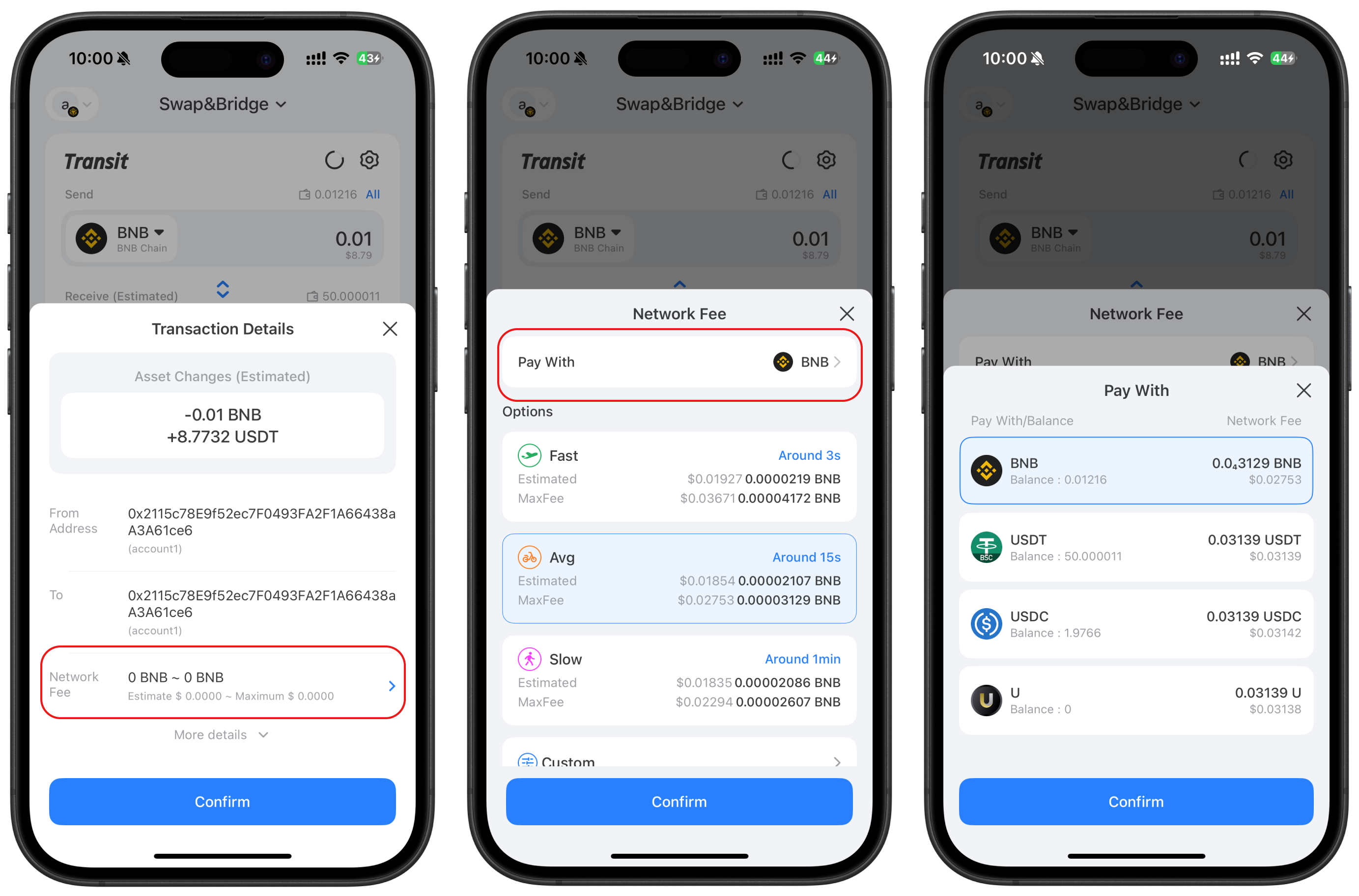
Under the "Network Fee" menu, select "Pay With". In addition to native tokens, you can choose stablecoins (such as USDT) for Gas fee payment.
{% hint style="success" %}
**Recommended:** TokenPocket [Solana Gas fee is free for a limited time](https://help.tokenpocket.pro/en/wallet-faq-en/solana-wallet/gas-free-service-on-solana). Click the link for details.
{% endhint %}
{% endstep %}
{% endstepper %}
## Part 2: How to Use the Gas-Free Service in "Swap\&Bridge"?
{% stepper %}
{% step %}
### **Download and open TokenPocket**
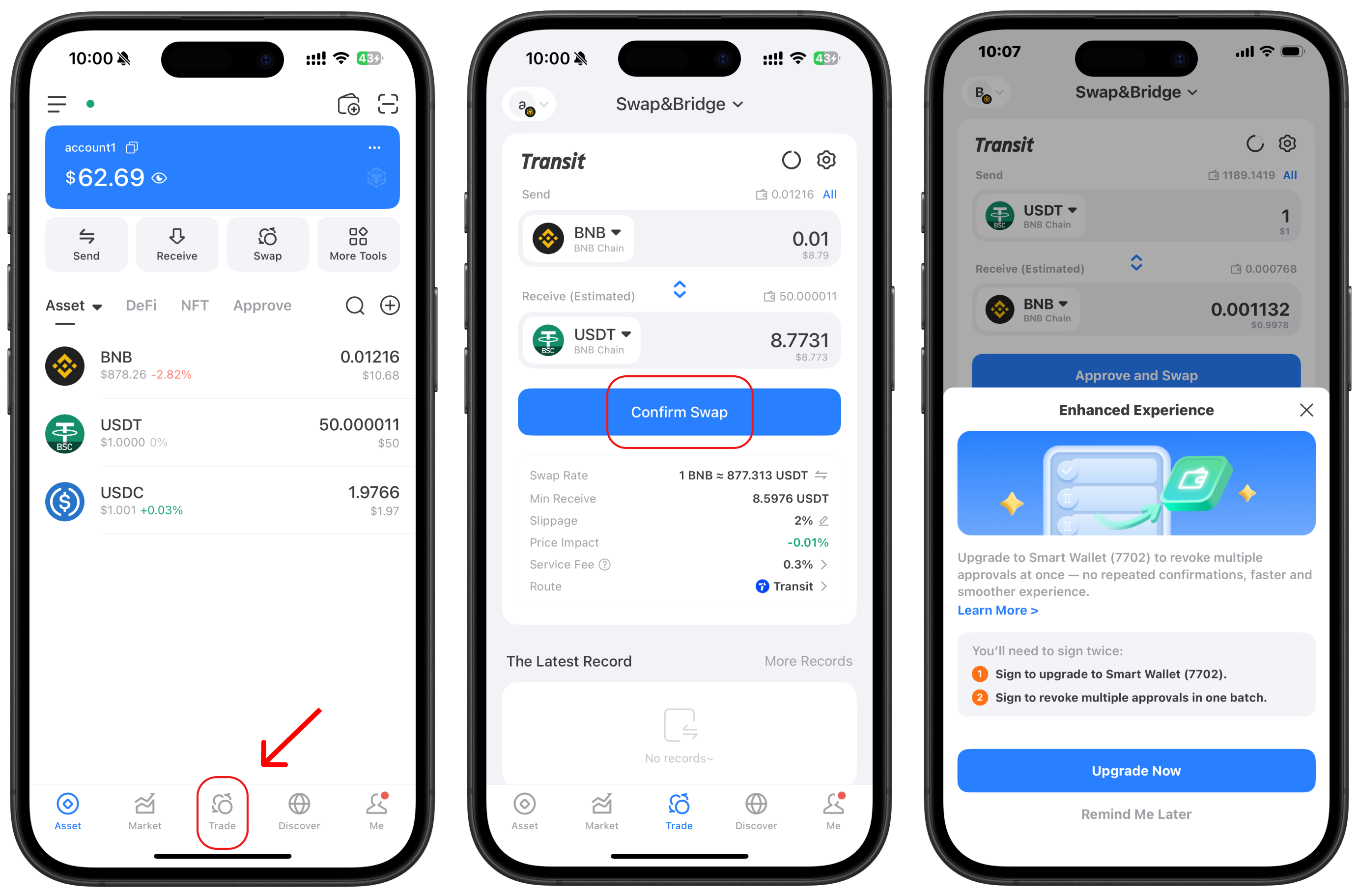
Download and open TokenPocket. Tap "Discover" at the bottom of the page, then fill in the required information following the usual trading steps. Tap "Confirm Swap", and follow the prompts to upgrade your wallet to an EIP-7702 smart wallet.
{% hint style="info" %}
Note: The gas sponsorship feature is developed based on EIP-7702.
{% endhint %}
{% endstep %}
{% step %}
### **Choose a stablecoin as the network fee**
After upgrading the wallet, return to the trading page, fill in the information, and initiate the transaction again. Tap the "Network Fee" field, then tap "Payment Method". You can then choose a stablecoin as the network fee based on your needs.
{% endstep %}
{% endstepper %}
## Conclusion
Using stablecoins to pay Gas fees is a qualitative leap in Web3 user experience. It makes on-chain operations as simple as our daily mobile payments, no longer requiring "change" for each chain.
Now use [TokenPocket](https://www.tokenpocket.pro/) to create or import your wallet and step into a new, convenient Web3 era. Freely explore the EVM ecosystem with stablecoins and make your Web3 journey smoother and more seamless!
{% hint style="info" %}
### Disclaimer
Cryptocurrency investment and usage involve market, legal, and technical risks. Please exercise caution. Always keep your seed phrases and private keys secure and never disclose them to anyone. This article is for educational purposes only and does not constitute investment advice. Before using wallets, conduct your own research and ensure compliance with local laws and regulations.
{% endhint %}