# How to Create and Import Merlin Wallet on TokenPocket

**TokenPocket** [**Chrome Extension**](https://extension.tokenpocket.pro/#/) **and** [**Mobile Wallet**](https://www.tokenpocket.pro/en/download/app) **support Merlin Network.**

### **Mobile Wallet Use Guide** <a href="#how-to-create-an-etc-wallet-in-tokenpocket" id="how-to-create-an-etc-wallet-in-tokenpocket"></a>

## **How to create a Merlin wallet in TokenPocket?** <a href="#how-to-create-an-etc-wallet-in-tokenpocket-1" id="how-to-create-an-etc-wallet-in-tokenpocket-1"></a>

1. Open TokenPocket APP, click ![](https://659607907-files.gitbook.io/~/files/v0/b/gitbook-x-prod.appspot.com/o/spaces%2F-MMJyYRLFVRsMrfcXuRV%2Fuploads%2FUjYAAs2G6BZ8CNsYXCiH%2Fimage.png?alt=media\&token=9adac656-510e-4346-8334-d99ad71f1417) on the upper right corner, click the search bar, and enter **Merlin**;

<figure><img src="https://2516903027-files.gitbook.io/~/files/v0/b/gitbook-x-prod.appspot.com/o/spaces%2F-MMJyYRLFVRsMrfcXuRV%2Fuploads%2FvHdVXod6fd8dkF2FCTx5%2Fimage.png?alt=media&#x26;token=55c2e045-048f-4d12-8736-505d97cfad8c" alt=""><figcaption></figcaption></figure>

2\. Click **\[Create Wallet]** and click **\[Create Wallet]** again;

<figure><img src="https://2516903027-files.gitbook.io/~/files/v0/b/gitbook-x-prod.appspot.com/o/spaces%2F-MMJyYRLFVRsMrfcXuRV%2Fuploads%2FDnESp5uvozvoamhxmjFP%2Fimage.png?alt=media&#x26;token=70f9603f-20d6-4de1-8cd9-dd6325666536" alt=""><figcaption></figcaption></figure>

3\. Set the wallet name and password, click the User Agreement, and click **\[Create Wallet].** Watch and learn the video content, click **\[Understood].**

<figure><img src="https://2516903027-files.gitbook.io/~/files/v0/b/gitbook-x-prod.appspot.com/o/spaces%2F-MMJyYRLFVRsMrfcXuRV%2Fuploads%2FuaWeIeB1o36uRwx3A3ZT%2Fimage.png?alt=media&#x26;token=b4d3b95a-2dc1-47b4-a1e9-3454e397a784" alt=""><figcaption></figcaption></figure>

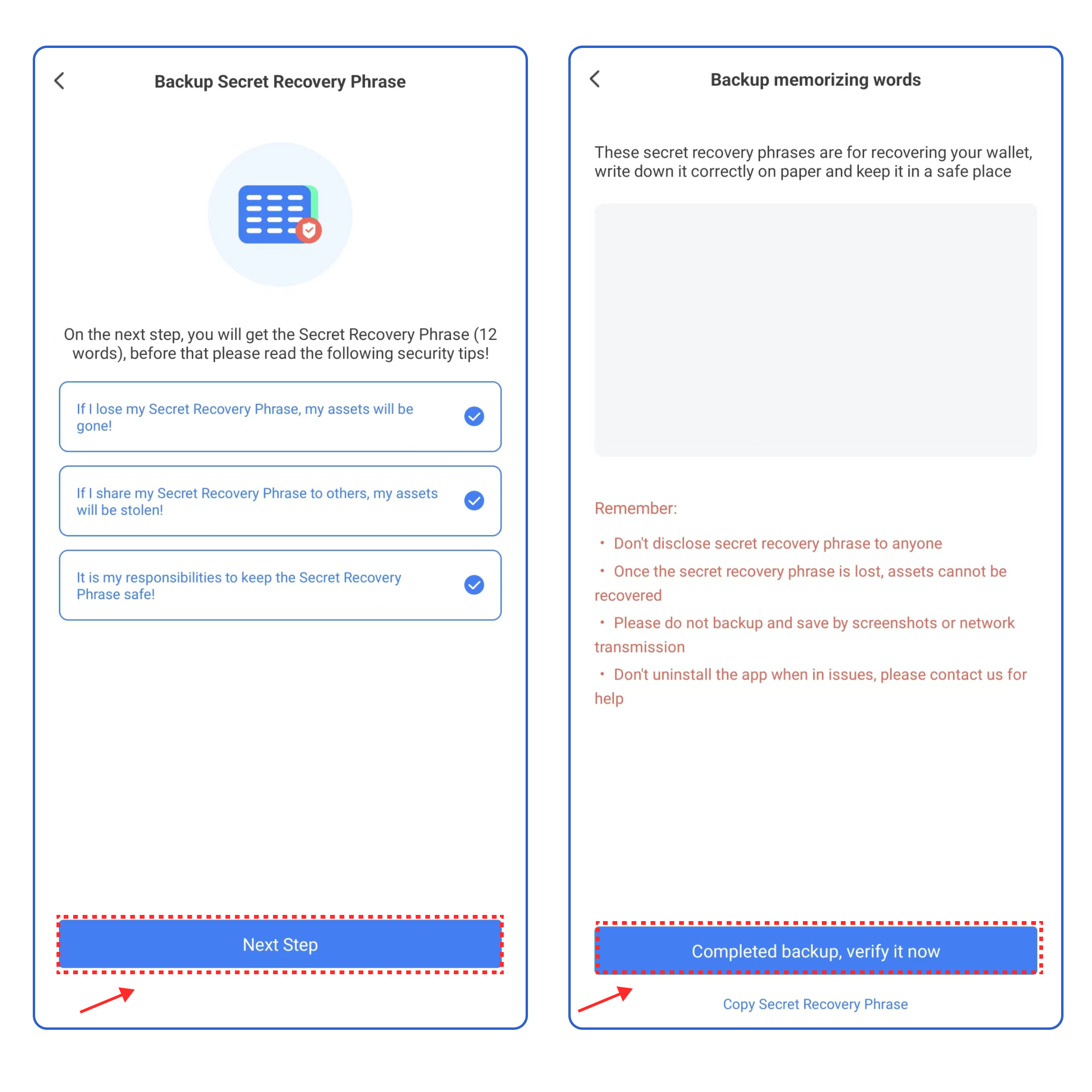
4\. Select the security tips, and click **\[Next Step]**. Back up the secret recovery phrase on the paper or on the [**KeyPal**](https://www.keypal.pro/en/), and store it in a safe place. Click **\[Completed backup, verify now]** .

<figure><img src="https://2516903027-files.gitbook.io/~/files/v0/b/gitbook-x-prod.appspot.com/o/spaces%2F-MMJyYRLFVRsMrfcXuRV%2Fuploads%2FkcDHnAxXze5AMJgJ3BTy%2Fimage.png?alt=media&#x26;token=775ff894-c261-423d-9b9e-b895de452336" alt=""><figcaption></figcaption></figure>

5\. Enter your secret recovery phrase, and click **\[Confirm].** At this point, you have successfully created a **Merlin** wallet.

<figure><img src="https://2516903027-files.gitbook.io/~/files/v0/b/gitbook-x-prod.appspot.com/o/spaces%2F-MMJyYRLFVRsMrfcXuRV%2Fuploads%2FeTD3p2S16EG4yn4KcRJd%2Fimage.png?alt=media&#x26;token=c5f3989e-5da3-4ed6-bbf2-5d881bbe59a8" alt=""><figcaption></figcaption></figure>

**Attention: Do not disclose the private key or secret recovery phrase to the third party!**

## **How to import a Merlin wallet into TokenPocket?** <a href="#how-to-import-an-etc-wallet-into-tokenpocket" id="how-to-import-an-etc-wallet-into-tokenpocket"></a>

1. Open TokenPocket APP, click![](https://659607907-files.gitbook.io/~/files/v0/b/gitbook-x-prod.appspot.com/o/spaces%2F-MMJyYRLFVRsMrfcXuRV%2Fuploads%2FURwrKk5aqL1DfK7y6JTH%2Fimage.png?alt=media\&token=089afde0-3200-4772-8125-ae1115af592e)on the upper right corner, click the search bar and enter **Merlin;**

<figure><img src="https://2516903027-files.gitbook.io/~/files/v0/b/gitbook-x-prod.appspot.com/o/spaces%2F-MMJyYRLFVRsMrfcXuRV%2Fuploads%2FESpMxbWWgcBciRUFzzOG%2Fimage.png?alt=media&#x26;token=e7efa419-8b74-493a-bffd-739ba3614a14" alt=""><figcaption></figcaption></figure>

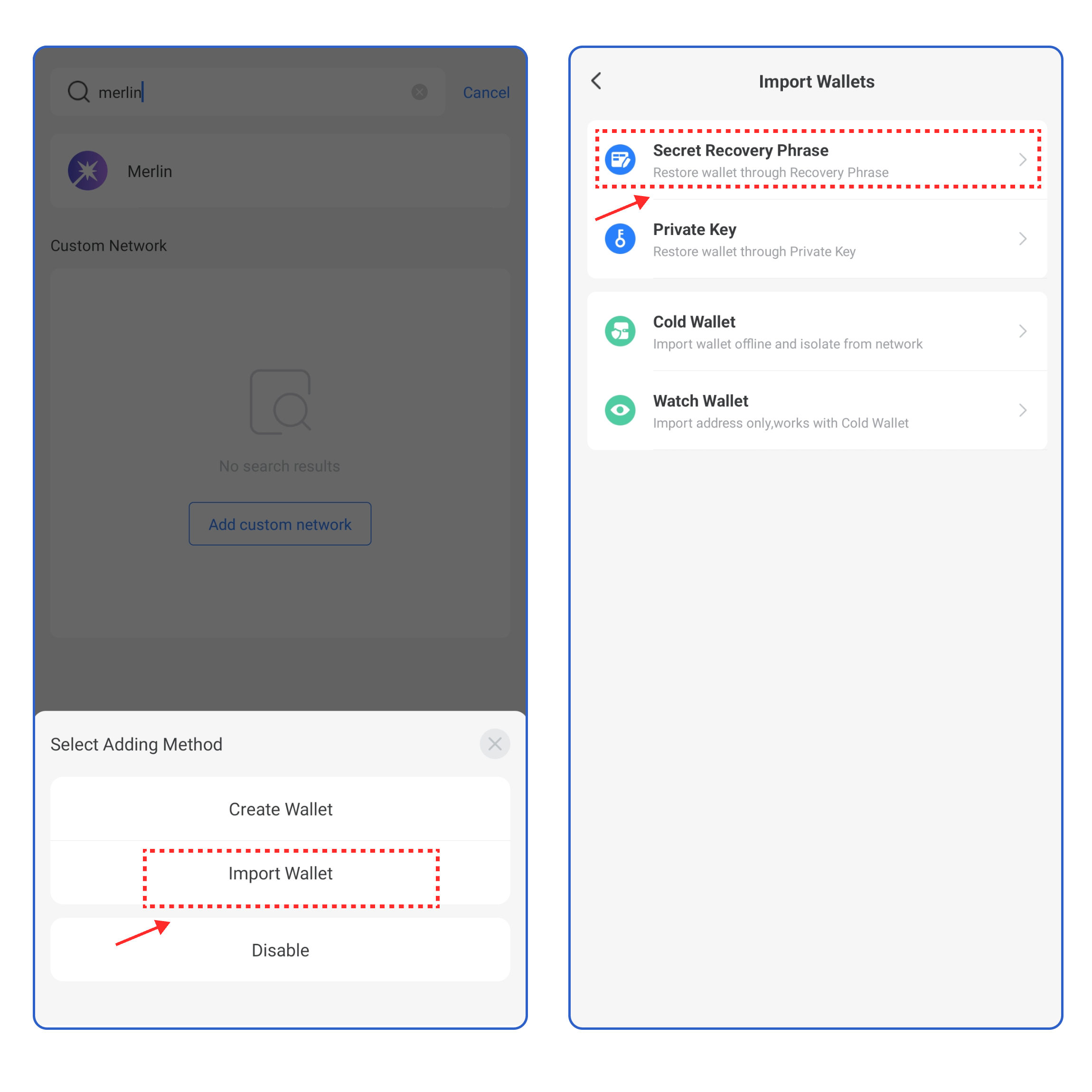
2\. Click **\[Import Wallet]**, and select the way you want to import your wallet.

<figure><img src="https://2516903027-files.gitbook.io/~/files/v0/b/gitbook-x-prod.appspot.com/o/spaces%2F-MMJyYRLFVRsMrfcXuRV%2Fuploads%2FmOa2x0jtCjHMp98RtXCg%2Fimage.png?alt=media&#x26;token=d9dbfb8f-be18-4f2c-9ac1-057fed965f62" alt=""><figcaption></figcaption></figure>

3\. Take **\[Recovery Phrase import]** as an example, enter your secret recovery phrase, wallet name, and password, click the User Agreement, and click **\[Import Wallet]**. At this point, you have successfully imported a **Merlin** wallet.​​

<figure><img src="https://2516903027-files.gitbook.io/~/files/v0/b/gitbook-x-prod.appspot.com/o/spaces%2F-MMJyYRLFVRsMrfcXuRV%2Fuploads%2Fx8jptRinWWAEKGG6gfcw%2Fimage.png?alt=media&#x26;token=7bdf699a-17c1-4719-aeda-757a4dd17c8e" alt=""><figcaption></figcaption></figure>

### **How to sync a Merlin wallet on TokenPocket?** <a href="#how-to-import-an-etc-wallet-into-tokenpocket-1" id="how-to-import-an-etc-wallet-into-tokenpocket-1"></a>

1. Open TokenPocket APP, click![](https://659607907-files.gitbook.io/~/files/v0/b/gitbook-x-prod.appspot.com/o/spaces%2F-MMJyYRLFVRsMrfcXuRV%2Fuploads%2FUjYAAs2G6BZ8CNsYXCiH%2Fimage.png?alt=media\&token=9adac656-510e-4346-8334-d99ad71f1417)on the upper right corner, click the search bar and enter **Merlin**;&#x20;

<figure><img src="https://2516903027-files.gitbook.io/~/files/v0/b/gitbook-x-prod.appspot.com/o/spaces%2F-MMJyYRLFVRsMrfcXuRV%2Fuploads%2FVasvbG1EY1mkKXLbeEHD%2Fimage.png?alt=media&#x26;token=1725f65b-4efc-4da0-a208-4e7c408f7ce3" alt=""><figcaption></figcaption></figure>

2. Click **【Create Wallet】**, click **【Sync Wallet】.**

<figure><img src="https://2516903027-files.gitbook.io/~/files/v0/b/gitbook-x-prod.appspot.com/o/spaces%2F-MMJyYRLFVRsMrfcXuRV%2Fuploads%2F9hhL6HKi8IFr7uRJhJ9r%2Fimage.png?alt=media&#x26;token=b676edad-6e04-42ef-b937-0014150b8235" alt=""><figcaption></figcaption></figure>

3. Select the network you want to sync and clic&#x6B;**【Synchronize】**, you can view your wallet on **Merlin Network.**

<figure><img src="https://2516903027-files.gitbook.io/~/files/v0/b/gitbook-x-prod.appspot.com/o/spaces%2F-MMJyYRLFVRsMrfcXuRV%2Fuploads%2Fj9KtNKICHLp7TF3XAp2D%2Fimage.png?alt=media&#x26;token=2c6cdd14-b2d3-441c-9dec-46b4ffe83355" alt=""><figcaption></figcaption></figure>

### Chrome Extention Use Guide <a href="#chrome-extention-use-guide" id="chrome-extention-use-guide"></a>

1. Open TokenPocket Chrome Extension, and click the upper left corner to select the **Merlin Network**.

<figure><img src="https://2516903027-files.gitbook.io/~/files/v0/b/gitbook-x-prod.appspot.com/o/spaces%2F-MMJyYRLFVRsMrfcXuRV%2Fuploads%2FPoSZsh9O1aYQkGFKWRpP%2Fimage.png?alt=media&#x26;token=92a80f15-2ea5-47de-89f9-d51e40d9de37" alt=""><figcaption></figcaption></figure>

2. After you select, you can view your **Merlin** **Wallet** on the Assets page, click the upper right corner to access the management page, you can switch your wallet, and create/import a wallet on this page.

<figure><img src="https://2516903027-files.gitbook.io/~/files/v0/b/gitbook-x-prod.appspot.com/o/spaces%2F-MMJyYRLFVRsMrfcXuRV%2Fuploads%2Fo4oUijOk32ASJkPYaxsO%2Fimage.png?alt=media&#x26;token=9978de6e-d96a-4216-af9a-2cff5162bc6c" alt=""><figcaption></figcaption></figure>