> For the complete documentation index, see [llms.txt](https://help.tokenpocket.pro/en/llms.txt). Markdown versions of documentation pages are available by appending `.md` to page URLs; this page is available as [Markdown](https://help.tokenpocket.pro/en/wallet-operation/how-to-create-a-wallet/tempo.md).
# How to Create and Import a Tempo Wallet in TokenPocket? (Mobile & Extension Tutorial)
Learn how to create or import a Tempo wallet in TokenPocket. This step-by-step guide helps you securely manage your crypto assets on Tempo.
## How to Create and Import a Tempo Wallet in TokenPocket? (Mobile & Extension Tutorial)
Tempo is a high-performance Layer-1 blockchain designed specifically for machine payments and AI-driven commerce. It supports efficient stablecoin payments, ultra-low-cost transactions, and the Machine Payments Protocol (MPP). With extremely high throughput and minimal fees, Tempo enables instant global value transfers between machines. TokenPocket, with its secure and user-friendly features, serves as the ideal gateway to the Tempo ecosystem. This guide will walk you through how to easily create and import a Tempo wallet and start exploring the Tempo ecosystem.
### Part 1: How to Create a Tempo Wallet
TokenPocket offers both mobile (Android/iOS) and Chrome extension versions. Choose the method that best suits you.
**1. Mobile (Android / iOS)**
{% stepper %}
{% step %} **Download and Open TokenPocket**
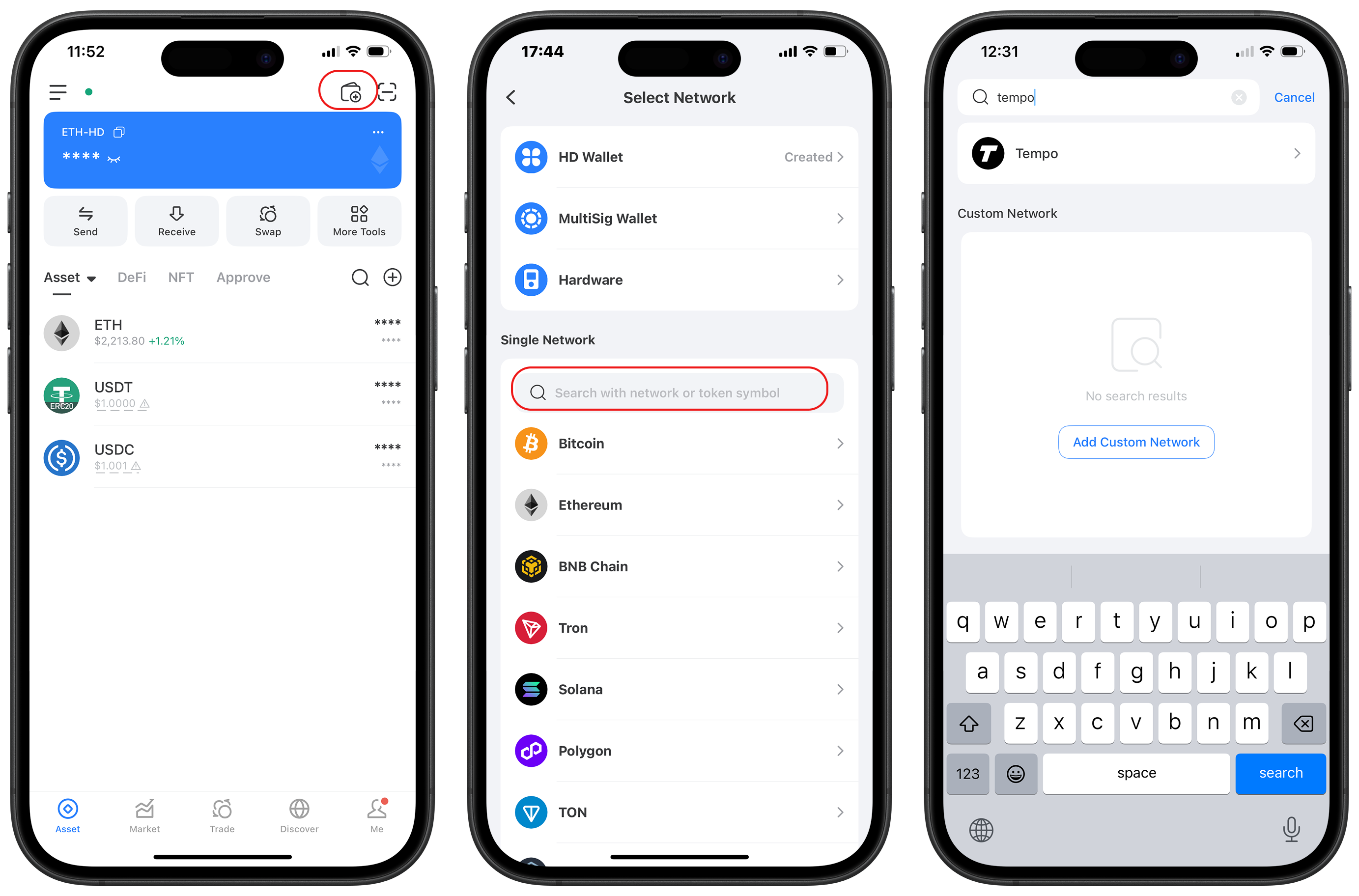
Download and open the [TokenPocket](https://www.tokenpocket.pro/) App, tap the wallet icon in the top right corner, then tap the search bar and enter “Tempo”.
{% endstep %}
{% step %} **Tap Create Wallet**
Tap \[Create Wallet] and set a wallet name.
* Android version: You will also need to set a password (recommended: 8+ characters including letters, numbers, and symbols) and agree to the terms.
* iOS version: Simply set the name and tap “Next”.
{% endstep %}
{% step %} **Back Up Your Recovery Phrase**
Back up your mnemonic phrase (or other recovery phrase) offline (e.g., write it down on paper) and store it securely. Then tap \[Check Backup] and follow the prompts to verify your phrase.
{% hint style="warning" %}
**Note:** Never save your recovery phrase via screenshot, or share your private key or mnemonic phrase with anyone! Doing so may result in permanent loss of your tokens!
{% endhint %}
{% endstep %}
{% step %} **Creation Complete**
Congratulations! You have successfully created a Tempo wallet. You can now manage Tempo assets, perform stablecoin transfers, interact with the MPP protocol, and explore the Tempo ecosystem right inside TokenPocket.
{% endstep %}
{% endstepper %}
#### **2. Extension Wallet**
Open the TokenPocket extension wallet, click the network button at the top, and select the Tempo network from the “All” menu to create a new Tempo wallet address.
### Part 2: How to Import a Tempo Wallet
{% stepper %}
{% step %} **Open TokenPocket**
Open the TokenPocket App, tap the wallet icon in the top right corner, then tap the search bar and enter “Tempo”.
{% endstep %}
{% step %} **Choose Import Method**
Tap \[Import Wallet] and select your preferred import method (the example below uses mnemonic phrase).
{% hint style="warning" %}
**Tip:** If you previously set a [Passphrase](https://help.tokenpocket.pro/en/security-knowledge/security-measure/passphrase), you must enter it during import to recover the correct address.
{% endhint %}
{% endstep %}
{% step %} **Import Complete**
Enter your mnemonic phrase, set a wallet name, and confirm. Your Tempo wallet is now successfully imported.
{% endstep %}
{% endstepper %}
### Tempo Wallet FAQ
#### **1. What is Tempo?**
Tempo is a payment-optimized Layer-1 blockchain that offers high TPS, extremely low fees, native stablecoin support, and the Machine Payments Protocol (MPP), enabling AI agents to autonomously transfer value across the internet. Its core mission is to enable efficient, instant value flow between machines.
#### **2. Which wallets support Tempo?**
If you're looking for a feature-rich and easy-to-use wallet, we highly recommend TokenPocket. TokenPocket fully supports the Tempo mainnet and integrates a rich DApp ecosystem and trading features, allowing you to effortlessly manage digital assets on Tempo, participate in ecosystem projects, and enjoy a friendly interface with strong security — making it the ideal choice for Tempo network assets.
### Conclusion
With this tutorial, you now know exactly how to create and import your Tempo wallet in [TokenPocket](https://www.tokenpocket.pro/). You now hold the key to the Tempo ecosystem. Manage your assets with ease, explore various decentralized applications (DApps), and participate in this vibrant blockchain world.
**Always remember:** Security comes first. Treat your mnemonic phrase and private key with the same care you would give to your most valuable possessions.
{% hint style="info" %}
#### **Disclaimer**
Cryptocurrency investment and usage involve market, legal, and technical risks. Please operate cautiously. Always safeguard your recovery phrase and private key, and do not disclose them to anyone. This article is for reference only and does not constitute investment advice. Before using the wallet, conduct your own research and comply with applicable laws and regulations.
{% endhint %}


.png?alt=media&token=25d10ae0-9b3f-4874-9d91-fa2e6cc4f2d7)