# 方法2：密钥导入找回

### <mark style="color:orange;">案例解析：</mark> <a href="#id-0" id="id-0"></a>

小韩从交易所提取代币到以太坊钱包，因为错误的选择了BSC提币网络导致无法到账。通过交易所提币历史记录中可以看出，当前的提币状态已完成，并且通过区块链浏览器查询到同样的已完成的结果。

那么小韩的资产会因此丢失吗？

<figure><img src="/files/2x5QLJsbNUYprPouN7Uo" alt=""><figcaption></figcaption></figure>

### <mark style="color:orange;">资产找回原理：</mark> <a href="#id-1" id="id-1"></a>

资产可以找回，依托于此类公链都属于EVM公链，它是以太坊虚拟机链的简称，是与以太坊虚拟机（EVM）兼容的区块链网络，如以太坊、BNB Chain、Polygon、Arbitrum等公链。这类公链的特点就是地址、密钥都是可以公用的，但是代币无法互通。基于EVM网络的特点，我们可以通过钱包同步或密钥导入的方式来找回资产，前提是这个提币的收款地址属于你自己控制。

### <mark style="color:orange;">密钥导入方式找回：</mark> <a href="#id-2" id="id-2"></a>

密钥导入方式需要依据交易所提币网络，或者是钱包中转出的网络来进行判断，<mark style="color:red;">需要确定</mark><mark style="color:red;">**转出网络**</mark><mark style="color:red;">和收款地址（属于自己管理）</mark>。

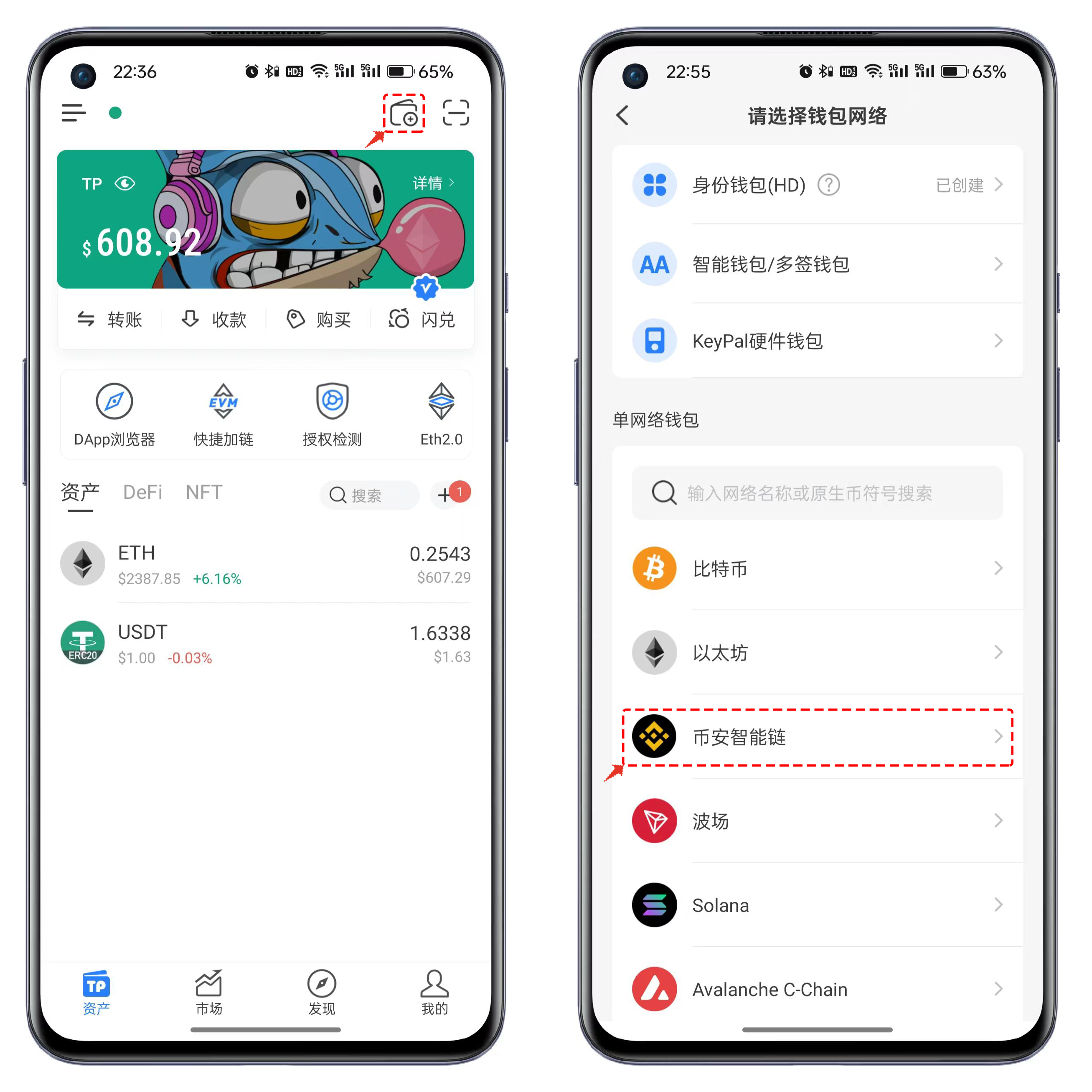
1、打开TokenPocket，点击右上角添加钱包，在列表中选择提款或转出的网络（例如BSC网络）。

<figure><img src="/files/Pkht7jSXhBXuSpupW6LT" alt=""><figcaption></figcaption></figure>

2、添加方式中选择【导入钱包】，使用备份的密钥来导入钱包并找回资产。

<mark style="color:red;">需要注意的是：请务必在安全的环境中进行操作，不要泄露密钥数据。</mark>

<figure><img src="/files/2sGZvc1wRiEsdmpR9F8d" alt=""><figcaption></figcaption></figure>


---

# Agent Instructions: Querying This Documentation

If you need additional information that is not directly available in this page, you can query the documentation dynamically by asking a question.

Perform an HTTP GET request on the current page URL with the `ask` query parameter:

```
GET https://help.tokenpocket.pro/cn/transfer-tutorial/about-public-chain-transfer/import.md?ask=<question>
```

The question should be specific, self-contained, and written in natural language.
The response will contain a direct answer to the question and relevant excerpts and sources from the documentation.

Use this mechanism when the answer is not explicitly present in the current page, you need clarification or additional context, or you want to retrieve related documentation sections.