> For the complete documentation index, see [llms.txt](https://help.tokenpocket.pro/en/llms.txt). Markdown versions of documentation pages are available by appending `.md` to page URLs; this page is available as [Markdown](https://help.tokenpocket.pro/en/wallet-operation/how-to-create-a-wallet/klaytn-use-guide.md).
# How to Create and Import Klaytn Wallet on TokenPocket
Learn how to create and import Klaytn wallet on TokenPocket, including mnemonic backup, private key import, and secure wallet management.
## TokenPocket [plugin wallet ](https://extension.tokenpocket.pro/#/)and [mobile wallet](https://www.tokenpocket.pro/en/download/app) both support Klaytn!
**How to create a Klaytn wallet in TokenPocket**
1. Open TokenPocket, click on the top right corner to add a wallet, search and select Klaytn from the list;
2. In the adding method, choose "Create Wallet." There are four options in the creation list, all of which are daily use wallet functions. Click "Create Wallet" for the first time use.
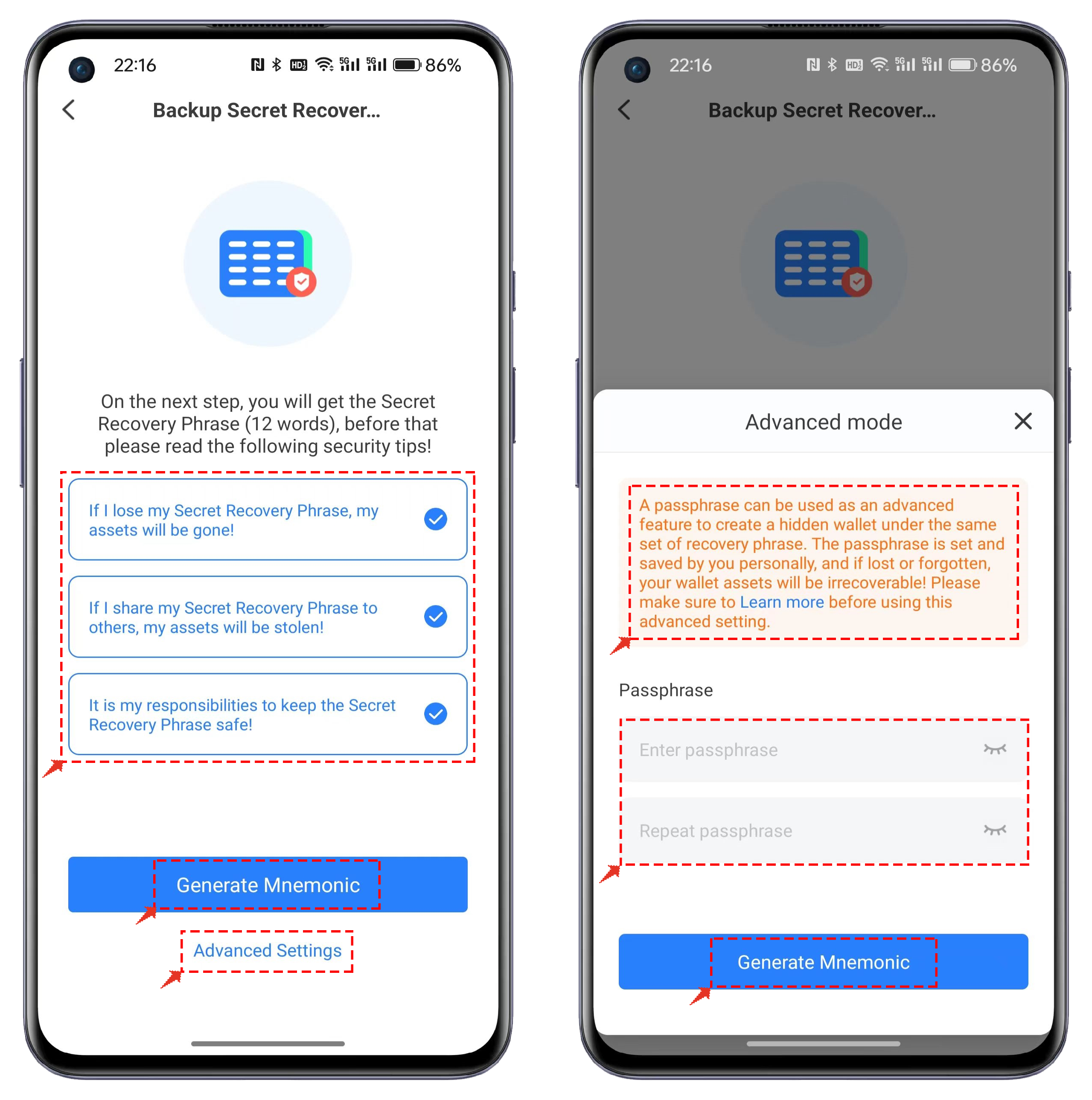
3. The backup mnemonic function is consistent with the creation of wallets on other public chains. It's important to note that clicking on "Advanced Settings" allows you to create a wallet using the Passphrase method. For this type of wallet, it is essential to use the correct mnemonic + the correct password to import the correct wallet address.
**Note: Do not disclose the mnemonic phrase to anyone!**
4. Be sure to use an offline method to back up the mnemonic phrase, and avoid loss or leakage. If the wallet was created using the Passphrase method, remember your mnemonic phrase and the set passphrase. Once the verification of the mnemonic phrase is complete, you can create a Klaytn wallet.
**How to import a Klaytn wallet in TokenPocket**
1. Open TokenPocket, click on the top right corner to add a wallet, and select Klaytn from the list.
2. Click on "Import Wallet," and then choose either "Private Key Import" or "Secret Recovery Phrase Import.
3. Taking mnemonic import as an example, enter the backed-up mnemonic phrase, wallet name, password, and check the "Terms of Service and Privacy Policy." Click on "Import Wallet," and at this point, you have successfully imported the Klaytn wallet. (Clicking on advanced mode allows you to enter the passphrase in creating a wallet.)
**Note: To ensure the security of your funds, do not disclose the mnemonic phrase or private key to anyone!**